Properties that are Common to Configuration Items
The following properties appear at the top of the SCADAPack x70 tab on the Forms of SCADAPack x70 Analog, Digital, Counter, and String Configuration items:
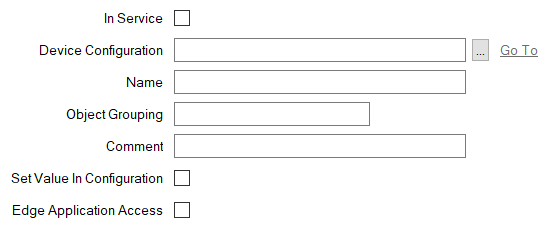
- In Service—Use to specify whether the Configuration item is 'In Service' and included in the downloaded/exported configuration (see The 'In Service' Check Box and Items Taken Out of Service).
- Device Configuration—Use to specify the SCADAPack x70 Device with which the Configuration Item is associated. Use the browse button to display a Reference browse window and then select the required entry from the window.
- Name—Use to specify a unique name for the item. The name has to begin with a letter or an underscore and can be between 1 and 32 characters long. It can only contain letters, numbers, and underscores. It cannot contain any spaces.
If you have imported or uploaded a SCADAPack x70 Logic application into Geo SCADA Expert then the names of each SCADAPack x70 Configuration item that is a logic variable (has a Logic Variable Type that is not None) must not be changed. If you rename the Configuration item a validation error is generated (see Specify any SCADAPack x70 Logic Requirements).
The
SYS_prefix is reserved for system data. Only specify a name that starts with theSYS_prefix if the SCADAPack x70 Configuration item is being used to monitor or control system data on the SCADAPack x70 device (see Monitor or Control System Data on a SCADAPack x70 Device). In which case, theSYS_prefix entry in the Name field has to match that specified in the System Data Reference field on the Configuration item's Mapping tab (see Configure the Properties on the Mapping Tab).You are not restricted to using
SYS_prefix entries in the Name field for Configuration items that map to system data. Instead, you might choose to enter another valid name that does not start with theSYS_prefix.Examples of valid configuration:
Name: SYS_STATUS_Uptime
System Data Reference: SYS_STATUS_UptimeName: Uptime
System Data Reference: SYS_STATUS_UptimeExample of invalid configuration (as the two SYS_ entries do not match):
Name: SYS_STATUS_DeviceReady
System Data Reference: SYS_STATUS_UptimeLogic programming allows you to define items that appear in structures or arrays.
For example:
- an item name within a structure is identified as
structurename.itemname. The total length of an item name within a structure can exceed 32 characters. Thestructurenameanditemnameare limited to 32 characters each. Together with the dot that separates thestructurenameanditemnamethe maximum length is 64 characters. - an item name that appears within an array is identified as
itemname[n]wherenidentifies the position within the array. The total length is limited to 32 characters.
You can, when required, enter item names for items that appear within a structure or array.
- an item name within a structure is identified as
- Object Grouping—Use to optionally assign an 'Object group' to the item. Object groups are not mandatory - you can use them to help to categorize and organize the items in the SCADAPack x70 device. For example, you might use a group for system or status items.
The name of an Object Group can be between 1 and 32 characters, including spaces. The name cannot contain the following characters:
< > # % \ " ; : ? @ & = + $ { } | ^ [ ]
- Comment—Use to optionally enter a description to help to identify the item. If the Configuration item is configured with a Logic Variable Type other than 'None', the comment will be shared with that SCADAPack x70 logic variable.
The comment can be between 1 and 255 characters, including spaces. It cannot contain the following characters:
< > # % \ " ; : ? @ & = + $ { } | ^ [ ]
- Set Value in Configuration—Use to control whether Geo SCADA Expert should initialize the value of the protocol-specific point linked to the Configuration item.
Select the check box for the SCADAPack x70 device to write the last known value of the protocol specific point when a Configuration download is requested.
Clear the check box for the SCADAPack x70 device to set the item to its default value when the Configuration is downloaded.
-
Edge Application Access—Only available for use when the Configuration item is on a SCADAPack 47xi device. Use this check box to control whether the point that this database item represents is exposed to the Edge application processor.
Select the check box to expose the point to the Edge application processor. The SCADAPack 47xi device connects to the Edge application platform via a port on which the Port Function is set to 'Edge' (see Port Function - Edge).
Clear the check box if the point is not to be exposed to the Edge application processor. This is the default setting.