Port Function - Edge
This port function is only available on a SCADAPack 47xi device.
Use the Edge port function to create a Linux device for the serial port. An Edge application that opens a connection to the Linux serial port device has exclusive use of that serial port. The port is not available for use for any other RTU platform functions.
When you select the Edge Port Function for a serial port, the following sections and properties are displayed. Configure the properties as required.
 General Setup
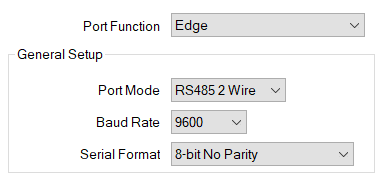
Use the combo box to specify the mode in which a port is operating. The options vary, depending on the port and device type, and can comprise a combination of the following:
Use the combo box to specify the baud rate used for transferring data via the port.
Use the combo box to specify the number of data bits used to transmit each byte of data and the parity. The options comprise:
- 8-bit No Parity
- 8-bit Even Parity
- 8-bit Odd Parity
- 8-bit No Parity 2 Stop Bits.
Terminal Server Setup

This setting identifies the TCP port that the server listens on. The port connects the Edge application platform to the serial port. You can enter a value from 1 to 65535. The default value is 50000.
Further Information
Specify which points are exposed to the Edge application processor: see Properties that are Common to Configuration Items.
Gateway IP Address (Edge): see Configure Ethernet Ports.
Add and Configure the Entries in an Edge Firewall Table.
For more information about Edge functionality, see the documentation provided with the SCADAPack x70 device.