The WebX server settings apply only to Original WebX.
Virtual ViewX settings are configured in Internet Information Services (IIS). These settings are configured by default when you install the Web and Mobile components of Geo SCADA Expert (see Virtual ViewX Server Setup Wizard). The Geo SCADA Expert server together with the IIS web server allows client PCs to access the Geo SCADA Expert system using a Web browser over a secure network connection.
To setup the Original WebX connections at the server, you need to access the WebX server settings:
- Display the Server Configuration Tool and log on if required.
- Expand the System Configuration branch of the tree-structure.
- Select the WebX entry.
 WebX Section
The figure below is interactive. You can select different parts of the figure in order to access further information about your selection.
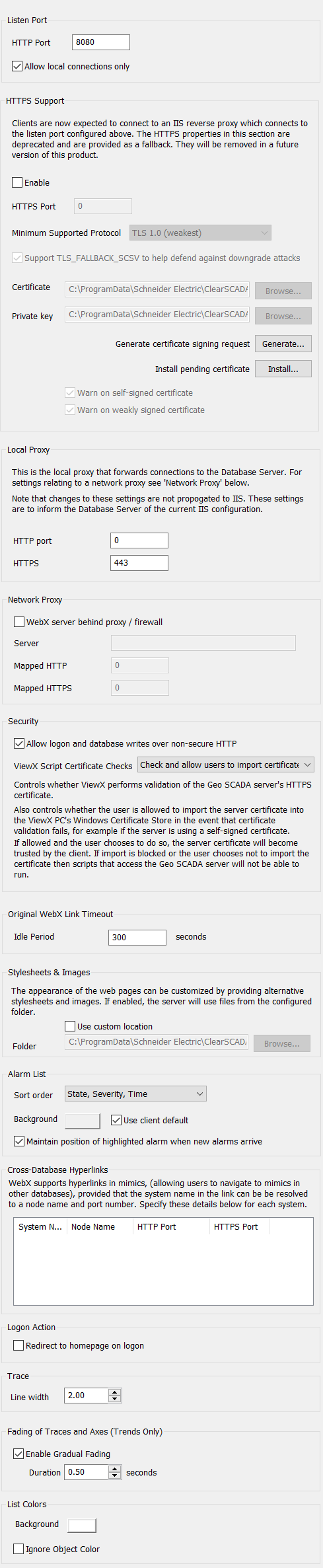
You can use the WebX settings to:
Set up the connection and security settings (see Configuring Security and Connection Settings for Original WebX Clients in the Geo SCADA Expert Guide to Security)
Set up various display settings that are specific to Original WebX clients. For more information, see the topics that are listed in the gray footer section at the bottom of this topic. Select the relevant entry to display the topic that you require.