Every item in the Geo SCADA Expert database has its own Status display (also referred to as a View window or View dialog). You view an item's Status display by selecting that item's View Status pick action or menu option. The Status display provides information about the status of the selected item, presenting the information in the form of 'status attributes'. For further information about working with Status displays, see Status Displays.
You can view the status of a Logic program by accessing its Status display:
- Display the Database Bar (see Display an Explorer Bar).
- In the Database Bar, right-click on the Logic program in which you are interested to display its context-sensitive menu.
- Select the View Status option to display the Logic program’s Status display.
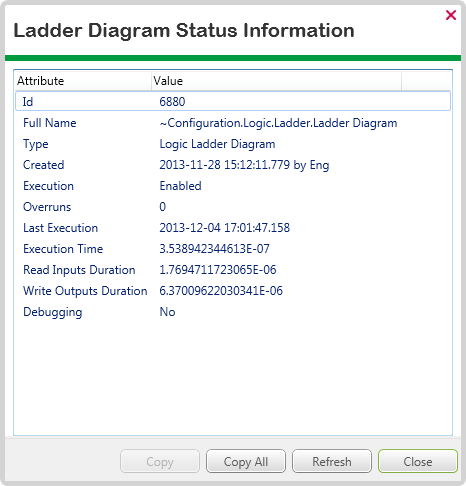
The Status Display provides status information about the Logic program, including attributes that are common to many types of database item such as Id and Full Name, as well as the following Logic-specific status attributes:
Execution
This has one of these values:
- Enabled—The Logic program has been manually enabled via the Enable Execution method or pick action. This means that the Logic program can be executed.
- Disabled—The Logic program has been manually disabled via the Disable Execution method or pick action. This means that the Logic program cannot be executed unless a user manually enables the Logic program. However, if the Logic program is copied or exported, the copy or export version will revert to the default setting of Enabled and so could be executed.
- Out of Service—The Logic program cannot be executed as it is set to out of service in its configuration. The Logic program will not execute, even if the Enable Execution method or pick action is used—it can only execute when it has the In Service setting enabled in its configuration.
Overruns
The number of times that the program has overrun. An overrun is when the program is set to execute at a set interval, but it takes longer than the interval to run. Overruns usually indicate that a Logic program is not running as often as required. If a program is overrunning, you should investigate it thoroughly to determine exactly why it is taking longer than expected to run, then make the appropriate configuration changes. If a Logic program continues to overrun, it can affect the running of other Logic programs.
Last Execution
The start time of the Logic program’s latest execution.
Execution Time
The length of time taken for the program’s latest execution.
Read Inputs Duration
The amount of time that the Logic program spent reading inputs during its latest execution.
Write Outputs Duration
The amount of time that the Logic program spent writing to outputs during its latest execution.
Debugging
Indicates whether the Logic program is open in Debug mode on a ViewX client (Yes or No). If the Debugging status is Yes, the Logic program will not run and cannot execute as another user is debugging the program. Manual and scheduled executions of the program cannot take place until the program is taken out of Debug mode (and the Debugging status becomes No).
Further Information
Status Attributes that are common to many database items: see Understand the Status Display in the Geo SCADA Expert Guide to ViewX and Virtual ViewX Clients.
View statistics about the Logic programs that have executed during the present snapshot interval: see Logic in the Geo SCADA Expert Guide to the Server Status Tool.
Debug a Logic program: see, as applicable: