Logic
The Database branch of the Server Status Tool includes a Logic category. You can use the category to investigate the status of Logic programs that have recently executed. By design, the category shows the Logic programs that have run during the latest snapshot interval. So if the snapshot interval is 15 minutes, then the category shows the Logic programs that have executed in the last 15 minutes.
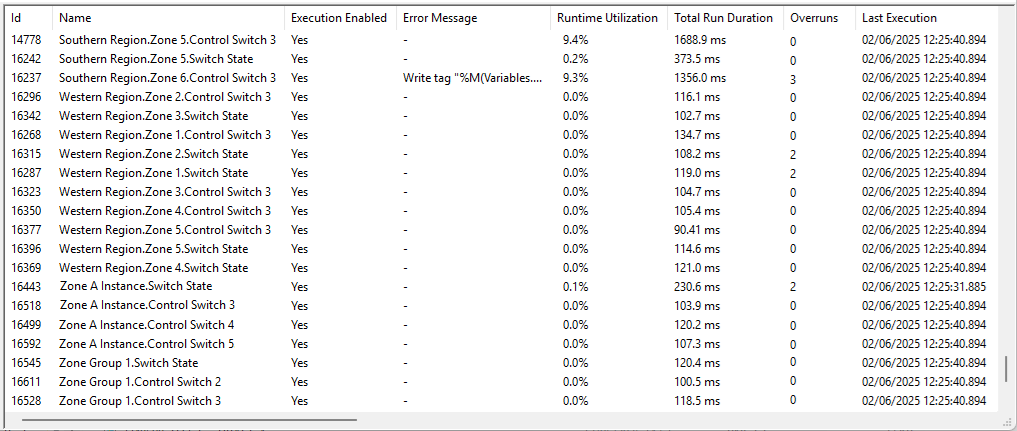
The information that is shown for each entry is as follows:
-
Id—The unique identifier that Geo SCADA Expert assigned to the Logic program item when it was created in the database.
-
Name—The full name of the Logic program, including its full path in the database.
-
Execution Enabled—Whether execution is enabled for the Logic program or not. This status is determined, for example, by the use of the Enable Execution and Disable Execution pick actions on the Logic program.
-
Error Message—Only populated if the latest attempt to execute the Logic program was unsuccessful. This gives a brief description of the apparent cause of the issue. For more information, see Troubleshooting - Logic Programs.
-
Runtime Utilization—The percentage of time that the Logic program has spent running since the Geo SCADA Expert server went Main or since the Logic program was last reconfigured (whichever occurred last).
-
Total Run Duration—The total amount of time that the Logic program has spent running since the server went Main or since the Logic program was last reconfigured (whichever occurred last).
-
Overruns—The number of overruns (if any) of the Logic program. For more information, see Logic Specific Status Attributes.
-
Last Execution—The date and time that the Logic program was last executed.
-
Start of Period—The start time of the statistics for inclusion in this Server Status Tool display. This is typically the start time of the latest snapshot interval.
-
Execution Count—The number of times that the Logic program has executed since the Start of Period.
-
Execution Duration—The duration of the last execution of the Logic Program.
-
Read Inputs Duration—The amount of time that the Logic program spent reading inputs during its last execution.
-
Write Outputs Duration—The amount of time that the Logic program spent writing to outputs during its last execution.
-
Write Config Count—The number of times that a write output has updated a configuration property since the Geo SCADA Expert server went Main or since the Logic program was last reconfigured (whichever occurred last).
-
Number of Instructions—The number of instructions that the Logic program performed during its last execution.
The configuration form of each Logic program includes an Instruction Limit property to define the maximum number of instructions that the program can execute in a single run (see Define the Number of Instructions for a Logic Program). Executions are aborted if they exceed this limit, to prevent the program from using too many resources.
-
Execution Queue Size—The number of pending executions of the Logic program. These are runs of the Logic program that are waiting to be executed.
The configuration form of each Logic program includes an Execution Queue Size property that you can use to specify how many pending executions can be queued (see Define the Maximum Number of Executions that can be Queued).
The Geo SCADA Expert server can only run one Logic program at a time.
-
Execution Queue Max—The greatest number of pending executions of this Logic program that have been in the queue since the Geo SCADA Expert server went Main or since the Logic program was last reconfigured (whichever occurred last).
The configuration form of each Logic program includes an Execution Queue Size property (see Define the Maximum Number of Executions that can be Queued). If the number of pending executions exceeds this size, the oldest values that are pending execution are discarded to make room for values that have a more recent timestamp.
-
Execution Queue Lost—The number of pending executions of this Logic program that have been discarded since the Geo SCADA Expert server went Main or since the Logic program was last reconfigured (whichever occurred last).
A non-zero value indicates that at some stage since this count started, the number of pending executions exceeded the Execution Queue Size that is configured for this particular Logic Program (see Define the Maximum Number of Executions that can be Queued). You should investigate the reason for the queue size being exceeded. For example, this might be due to executions taking longer than expected to run to completion, or to program execution being triggered more frequently than expected.
-
Quality—The current OPC Quality of the Logic program. This indicates the reliability of the Logic program's data.
-
Type—The logic language that the Logic program uses (see Supported Logic Languages).
Further Information
Logic Programs: see the Geo SCADA Expert Guide to Logic.