ATTENTION: This topic relates to the deprecated Original WebX client that is supported by this and previous versions of Geo SCADA Expert. Geo SCADA Expert 2025 will be the last version of the product to support and include the deprecated Original WebX client. For web client support, please use Virtual ViewX clients instead of Original WebX clients. For information about the Virtual ViewX client, click here.
Your user account can be associated with up to six Operator Document Stores.
To access your Operator Document Stores from a WebX client:
- Log on to WebX (see Log On to a WebX Client).
- Select the Documents button
on the navigation bar.
The top level of your Operator Document Stores is displayed.
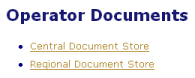
- Navigate the hierarchy as you would the Geo SCADA Expert database, to locate the document you require (see Use the WebX Interface).
For example:
- Select a hyperlink in the Children section to access an operator document, or another level of your Operator Document Stores hierarchy.
or:
- Select the hyperlink in the Parent section to display the group that contains the item or page you are currently viewing.
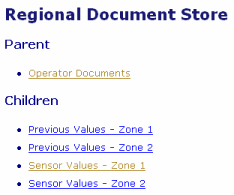
- Select a hyperlink in the Children section to access an operator document, or another level of your Operator Document Stores hierarchy.
- Select the hyperlink that indicates the required document’s name.
The selected Operator Document is displayed.