ATTENTION: This topic relates to the deprecated Original WebX client that is supported by this and previous versions of Geo SCADA Expert. Geo SCADA Expert 2025 will be the last version of the product to support and include the deprecated Original WebX client. For web client support, please use Virtual ViewX clients instead of Original WebX clients. For information about the Virtual ViewX client, click here.
This section applies if your system is not customized to use default views.
You can use the links on the database web page (see Browse your Database on a WebX Client) to access different levels of the database—the database web pages correspond to the various levels in the Database Bar tree-structure in ViewX (see Database Bar).
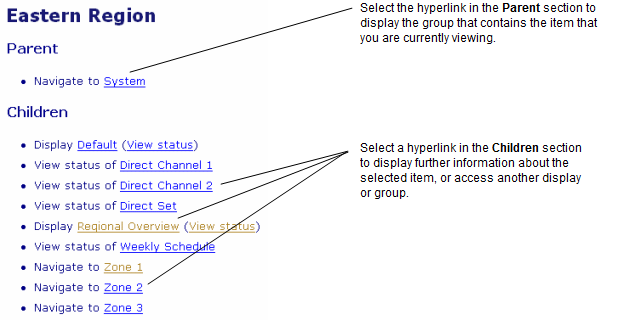
The Parent group links to the group above the item or page that you are viewing.
The Children group contains items that are part of the group that you are viewing, for example points or Mimics that are part of a group.
You can perform these actions on a WebX client:
- Follow a hyperlink—The mouse cursor will change to a pointing finger
when it is over a hyperlink. Select the hyperlink. A new web page is opened, replacing the one that you were viewing.
- Move to the level above on the tree—Select the parent group hyperlink.
- Open a Group—Select the group name hyperlink.
The Web browser remembers the order in which you have viewed WebX pages. The browser should provide buttons that allow you to move back and forth between the pages that you have been viewing. For example, the browser enables you to:
- View the previous page by selecting the Back button

- Select the Forward button
to reload the next page in your viewing sequence.
Specific actions you can perform on a WebX client include:
- View an Item’s Status on a WebX Client
- View a Mimic on a WebX Client
- Adjust the Magnification of a Mimic on a WebX Client
- Use the Object Menu on a Mimic on a WebX Client
- Use Custom Hyperlinks on a Mimic on a WebX Client
- Access Your Operator Document Stores on a WebX Client
- View and Action Alarms on a WebX Client
- View and Action Events on a WebX Client
- View and Action Lists on a WebX Client
- View and Action Trends on a WebX Client
- View the Most Recently Generated Version of a Report on a WebX Client.