You can check the current value of an SMS Service’s internal Fail Count in the Status display of that SMS Service database item. Being able to view the current value of the Fail Count is useful as it allows you to see if the Fail Count is nearing the Incoming SMS Fail Limit that has been configured for the SMS Service. It also allows you to check that the Fail Limit has been reset to 0 after a manual reset (see Resetting the Fail Count for Incoming SMS Commands).
The following Status display attributes are associated with the Fail Count for an SMS Service (see Pager Specific Status Display Attributes):
To check the current value of the Fail Count for an SMS Service:
- In the Database Bar, locate the relevant SMS Service database item and right-click on it to display its context-sensitive menu.
- Select the View Status option.
The Status display of the SMS Service is displayed. The Status display shows the value of the SMS Failed Command Count as well as other information such as the Alarm Count.Example:
The Incoming SMS Fail Limit of a particular SMS Service is set to 5. The SMS Failed Command Count status attribute in the figure below shows that the Fail Count of the SMS Service is currently 1, which is within this Fail Limit.
If the Fail Count exceeds the value that is configured in the Incoming SMS Fail Limit, an alarm is raised. The value of the SMS Failed Command Count status attribute changes to indicate that the processing of commands has been suspended.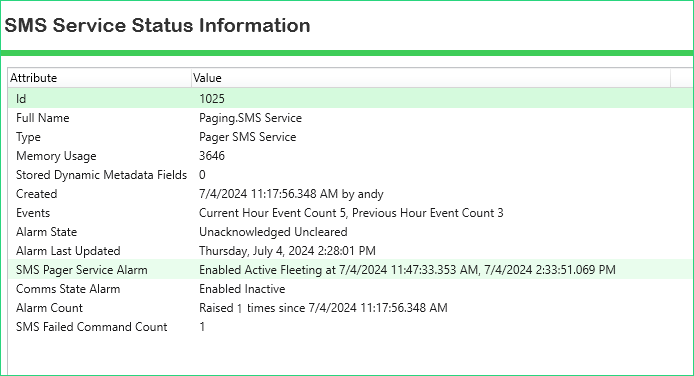
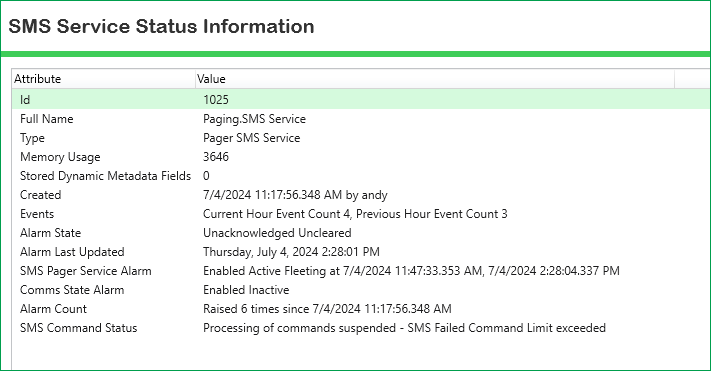
You will need to investigate the cause of the alarm and manually reset the Fail Count to 0 (see Resetting the Fail Count for Incoming SMS Commands).