Define the Program Limits on the Server
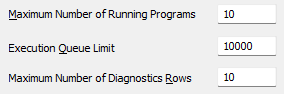
The Python section of the Server Configuration Tool includes these fields that you can use to specify limits for the Python programs that the Geo SCADA Expert server is to execute:
-
Maximum Number of Running Programs—The server can run several different Python programs at a time. Use this property to specify how many Python programs can run simultaneously on the server. If the server receives further 'Run' requests while this number of Python programs is already running, it will look to queue those requests. It will then run those requests once the number of Python programs that is currently running has dropped below this limit.
Enter the required value in the range 1 to 1000 inclusive. The default is 10.
Operators can use the Python Programs List to ascertain which programs are currently running. The List is a Queries List that you can access from the Queries Bar (see Display a Queries List).
-
Execution Queue Limit—Each Python program that the server can execute has its own queue limit (see Specify the Execution Queue Limit of a Python Program). Use this property on the server to specify the overall queue limit for all Python programs on the server. This limit takes precedence over the individual execution queue limits that you specify on the configuration form of each Python Program item. As such, if the Execution Queue Limit on the server is reached, it will discard any further 'Run' requests that it receives for any Python programs. This will happen regardless of whether the individual Execution Queue Limit has been reached for those Python programs.
The minimum value that you can specify for the Execution Queue Limit on the server is 1000. The maximum value that you can specify is 4,294,967,295. The default is 10000.
You can use the Programs category in the Server Status Tool to check whether any Python programs that are currently running or have pending runs have had any previous pending executions discarded (see Programs (Python Programs)). The Status display of individual Python Program items also provides this information (see Status Attributes that are Specific to the Python Driver).
-
Maximum Number of Diagnostics Rows—The Server Status Tool includes a Python branch (see Python Status Information). The branch contains several categories of statistics about the Python programs that the server can run. Several of these categories can contain multiple rows of statistics (one row per Python program) . Use the Maximum Number of Diagnostics Rows property to specify the maximum number of rows that those categories are to contain. While the server is running, it still maintains statistics about all of the Python programs that exist in the database, but only displays the statistics for up to this number of Python programs that best fulfill those particular categories.
Enter the required value in the range 10 to 100,000 inclusive. The default is 10.
Understand how the Settings Work
These examples demonstrate how the system-wide server settings work independently of the program-specific settings.
The server on a particular Geo SCADA Expert system includes these settings in the Python section of the Server Configuration Tool:
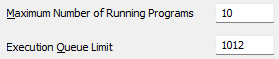
The database includes 2 Python Program items, named 'Python Program A' and 'Python Program B'.
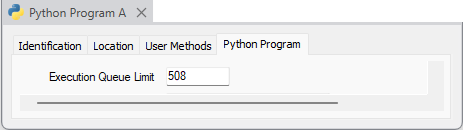
Python Program A includes this setting on its configuration form:
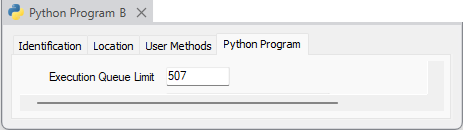
Python Program B includes this setting on its configuration form:
Python Program A is running and has 508 'Run' requests in its queue.
Python Program B is also running. It has 504 'Run' requests in its queue.
A user attempts to trigger a further 'Run' of Python Program B. The server discards this new 'Run' request as the system-wide Execution Queue Limit of 1012 has already been reached (508 'Run' requests for Python Program A plus 504 other 'Run' requests for Python Program B). This is despite only 2 Python programs running (out of a maximum of 10), and despite Python Program B not having exceeded its individual Execution Queue Limit.
This example uses the same server settings and Python Program settings that are shown in the figures in the example above.
The database includes 2 Python programs, named 'Python Program A' and 'Python Program B'.
Python Program A is running and has 507 'Run' requests in its queue.
Python Program B is also running. It has 501 'Run' request in its queue.
A user attempts to trigger a further 'Run' of Python Program A. The server adds this 'Run' request to the queue for that particular program.
A different user also attempts to trigger a further 'Run' of Python Program A. The server discards that further 'Run' request as the Execution Queue Limit of 508 for 'Python Program A' has been reached (the 507 earlier 'Run' requests, plus the 'Run' request triggered by the first user). This is regardless of the fact that the total number of queued 'Run' requests for all Python programs on the system has not exceeded the system-wide Execution Queue Limit of 1012.