Specify the DNP3 Static Group and Variation
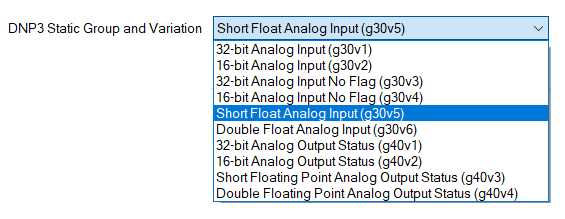
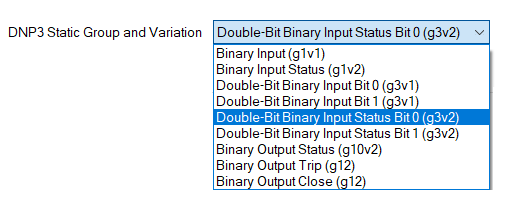
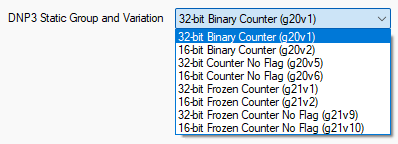
The DNP3 tab on the Forms of SCADAPack x70 <Point Type> Configuration items contains a DNP3 Static Group and Variation field. You use the field to specify the type of data that the SCADAPack x70 device sends in response to a DNP3 Class 0 (Static) data poll request from a DNP3 controlling station. The field's options vary, depending on the point type.
The following rules apply to the DNP3 Static Group and Variation setting for SCADAPack x70 Analog, Digital, and Counter Configuration items:
- If the object is associated with a DNP3 remote device, then the Direction setting in the Mapping tab must match the group (input or output) (see Configure the Properties on the Mapping Tab).
- If the object is associated with a Modbus Server device from a Modbus Scanner, then the Operation setting in the Modbus Scanners section in the Modbus tab of the associated Modbus Scanner must match the group. The Read operation must match input and Write, Read/Write operations must match output (see Configure the Modbus Scanners Settings).
- If the object is associated with a physical I/O channel, then the channel type (AI, AO, DI, DO, or CI) must match the group (see Define the Required I/O Channel Configuration).
- If the object is associated with the status of a physical I/O module, then the group must be an input type (see Configure the Common Properties of I/O Modules).
Non-adherence to the rules will result in a configuration error (see Correcting Invalid Configuration).
 Analog:
| Option | Description |
|---|---|
| 32-bit Analog Input (g30v1) | Sends the current value of an analog input point as a signed, 32-bit integer, in the range -2147483648 to +2147483647 where the DNP3 Controlling Station can process additional point status flags, such as overrange or underrange. |
| 16-bit Analog Input (g30v2) | Sends the current value of an analog input point as a signed, 16-bit integer, in the range -32768 to +32767 where the DNP3 Controlling Station can process additional point status flags, such as overrange or underrange. |
| 32-bit Analog Input No Flag (g30v3) | Sends the current value of an analog input point as a signed, 32-bit integer without status (quality) flags, in the range -2147483648 to +2147483647. Where the point does not have good quality, a group 30, variation 1 object is automatically reported for the point. This is a DNP3 protocol requirement. |
| 16-bit Analog Input No Flag (g30v4) | Sends the current value of an analog input point as a signed, 16-bit integer without status (quality) flags, in the range -32768 to +32767. Where the point does not have good quality, a group 30, variation 2 object is automatically reported for the point. This is a DNP3 protocol requirement. |
| Short Float Analog Input (g30v5) | Sends the current value of an analog input point as a signed, IEEE single-precision (32-bit) floating point number with status (quality) flags. |
| Double Float Analog Input (g30v6) | Sends the current value of an analog input point as a signed, IEEE double-precision (64-bit) floating point number with status (quality) flags. |
| 32-bit Analog Output Status (g40v1) | Sends the current value of an analog output point as a signed, 32-bit integer with status (quality) flags. You can also use this object to notify the DNP3 Controlling Station if the point value is modified elsewhere, for example due to internal state validation and point quality. |
| 16-bit Analog Output Status (g40v2) | Sends the current value of an analog output point as a signed, 16-bit integer with status (quality) flags. You can also use this object to notify the DNP3 Controlling Station if the point value is modified elsewhere, for example due to internal state validation and point quality. |
| Short Floating Point Analog Output Status (g40v3) | Sends the current value of an analog output point as a signed, IEEE single-precision (32-bit) floating point number with status (quality) flags. You can also use this object to notify the DNP3 Controlling Station if the point value is modified elsewhere, for example due to internal state validation and point quality. |
| Double Floating Point Analog Output Status (g40v4) | Sends the current value of an analog output point as a signed, IEEE double-precision (64-bit) floating point number with status (quality) flags. |
Binary:
| Option | Description |
|---|---|
| Binary Input (g1v1) |
Sends the current state of a binary input without status (quality) flags. The minimum transmitted data size for this object is 8 bits. Eight consecutive binary input objects are the same data length as a single binary input object. To improve transmission efficiency, group binary objects together in consecutive addresses. If the point quality is not indicated as good quality, a group 1, variation 2 object is automatically reported for the point. This is a DNP3 protocol requirement. |
| Binary Input Status (g1v2) | Sends the current state of a binary input with status (quality) flags, when the DNP3 Controlling Station can process point status flags, for example, online, offline or downstream device communications lost. |
| Double-Bit Binary Input Bit 0 (g3v1) |
Selects bit 0 of a double-bit binary input pair to represent the value of this Digital Configuration item. This DNP3 double-bit binary input point has to be used together with another Digital Configuration item configured as Double-bit Binary Input Bit 1 (g3v1). The minimum transmitted data size for this DNP3 double-bit binary input point is 8 bits. Four consecutive DNP3 double-bit binary input points are the same data length as one DNP3 double-bit binary input point. To improve transmission efficiency, group DNP3 double-bit binary input points together in consecutive addresses. If the DNP3 double-bit binary input point quality is not indicated as good quality, a group 3, variation 2 object is automatically reported for the DNP3 double-bit binary input point. This is a DNP3 protocol requirement. These DNP3 double-bit binary input points are represented in the Geo SCADA Expert database by a pair of SCADAPack x70 Digital Configuration items that can be associated with a SCADAPack x70 DNP3 binary input point. You specify the Bit 0 Digital Configuration item as the SCADAPack x70 Bit 0 Object on the configuration form of the SCADAPack x70 DNP3 double-bit binary input point (see Configure Binary Points for DNP3 Communications). The DNP3 Point Number for both the SCADAPack x70 Digital Configuration items has to match for them to be associated. If you mark either of the pair of SCADAPack x70 Digital Configuration items out of service, the other SCADAPack x70 Digital Configuration item is also taken out of service and neither of the items will be downloaded/exported. If either of the pair of SCADAPack x70 Digital Configuration items does not exist in the database, it results in a configuration error (see Correcting Invalid Configuration). For a pair of DNP3 double-bit SCADAPack x70 Digital Configuration items, the point data classes of both items must be the same (see Specify the Point Data Class used for DNP3 Communications). |
| Double-Bit Binary Input Bit 1 (g3v1) |
Selects bit 1 of a DNP3 double-bit binary input pair to represent the value of this SCADAPack x70 Digital Configuration item. This point has to be used together with another SCADAPack x70 Digital Configuration item configured as Double-bit Binary Input Bit 0(g3v1). The minimum transmitted data size for this DNP3 double-bit binary input point is 8 bits. Four consecutive DNP3 double-bit binary input points are the same data length as one DNP3 double-bit binary input point. To improve transmission efficiency, group binary points together in consecutive addresses. If the DNP3 double-bit binary input point quality is not indicated as good quality, a group 3, variation 2 object is automatically reported for the DNP3 double-bit binary input point. This is a DNP3 protocol requirement. These DNP3 double-bit binary input points are represented in the Geo SCADA Expert database by a pair of SCADAPack x70 Digital Configuration items that can be associated with a SCADAPack x70 DNP3 binary input point. You specify the Bit 1 Digital Configuration item as the SCADAPack x70 Bit 1 Object on the configuration form of the SCADAPack x70 DNP3 Binary Input Point (see Configure Binary Points for DNP3 Communications). The DNP3 Point Number for both the SCADAPack x70 Digital Configuration items has to match for them to be associated. If you mark either of the pair of SCADAPack x70 Digital Configuration items out of service, the other SCADAPack x70 Digital Configuration item is also taken out of service and neither of the items will be downloaded/exported. If either of the pair of SCADAPack x70 Digital Configuration items does not exist in the database, it results in a configuration error (see Correcting Invalid Configuration). For a pair of DNP3 double-bit SCADAPack x70 Digital Configuration items, the point data classes of both items must be the same (see Specify the Point Data Class used for DNP3 Communications). |
| Double-Bit Binary Input Status Bit 0 (g3v2) |
Selects bit 0 of a double-bit binary input pair to represent the value of this Digital Configuration item. This DNP3 binary input point has to be used together with another Digital Configuration item configured as Double-bit Binary Input Status Bit 1 (g3v2). These DNP3 double-bit binary input points are represented in the Geo SCADA Expert database by a pair of SCADAPack x70 Digital Configuration items that can be associated with a SCADAPack x70 DNP3 binary input point. You specify the Bit 0 SCADAPack x70 Digital Configuration item as the SCADAPack x70 Bit 0 Object on the configuration form of the SCADAPack x70 DNP3 Binary Input Point (see Configure Binary Points for DNP3 Communications). The DNP3 Point Number for both the SCADAPack x70 Digital Configuration items has to match for them to be associated. If you mark either of the pair of SCADAPack x70 Digital Configuration items out of service, the other SCADAPack x70 Digital Configuration item is also taken out of service and neither of the items will be downloaded/exported. If either of the pair of SCADAPack x70 Digital Configuration items does not exist in the database, it results in a configuration error (see Correcting Invalid Configuration). For a pair of DNP3 double-bit SCADAPack x70 Digital Configuration items, the point data classes of both items must be the same (see Specify the Point Data Class used for DNP3 Communications). |
| Double-Bit Binary Input Status Bit 1 (g3v2) |
Selects bit 1 of a double-bit binary input pair to represent the value of this Digital Configuration item. This DNP3 binary input point has to be used together with another Digital Configuration item configured as Double-bit Binary Input Status Bit 0 (g3v2). These DNP3 double-bit binary input points are represented in the Geo SCADA Expert database by a pair of SCADAPack x70 Digital Configuration items that can be associated with a SCADAPack x70 DNP3 binary input point. You specify the Bit 1 SCADAPack x70 Digital Configuration item as the SCADAPack x70 Bit 1 Object on the configuration form of the SCADAPack x70 DNP3 Binary Input Point (see Configure Binary Points for DNP3 Communications). The DNP3 Point Number for both the SCADAPack x70 Digital Configuration items has to match for them to be associated. If you mark either of the pair of SCADAPack x70 Digital Configuration items out of service, the other SCADAPack x70 Digital Configuration item is also taken out of service and neither of the items will be downloaded/exported. If either of the pair of SCADAPack x70 Digital Configuration items does not exist in the database, it results in a configuration error (see Correcting Invalid Configuration). For a pair of DNP3 double-bit SCADAPack x70 Digital Configuration items, the point data classes of both items must be the same (see Specify the Point Data Class used for DNP3 Communications). |
| Binary Output Status (g10v2) | Sends the current state of a binary output with status (quality) flags. You can also use this to notify the DNP3 Controlling Station if the point value is modified elsewhere, for example due to internal state validation and point quality. |
| Binary Output Trip (g12) |
Allows Trip/Close control of a pair of digital objects using DNP3 single-index complementary mode. When a Control Relay Output Block (CROB) Trip control is received, the SCADAPack x70 device pulses the output. You have to configure a separate SCADAPack x70 Digital Configuration item with the complementary (single-index) Close configuration. The DNP3 Point Number has to match with the complementary SCADAPack x70 Digital Configuration item. If you mark either of the pair of SCADAPack x70 Digital Configuration items out of service, the other SCADAPack x70 Digital Configuration item is also taken out of service and neither of the items will be downloaded/exported. If either of the pair of SCADAPack x70 Digital Configuration items does not exist in the database, it results in a configuration error (see Correcting Invalid Configuration). The Trip item defines the Controlling Station n Point Data Class for both the Trip and Close items. You have to set all the Controlling Station n Point Data Class fields of a Close item to Local, where n refers to the Controlling Station number (see Specify the Point Data Class used for DNP3 Communications). |
| Binary Output Close (g12) |
Allows Trip/Close control of a pair of digital objects using DNP3 single-index complementary mode. When a Control Relay Output Block (CROB) Close control is received, the SCADAPack x70 device pulses the output. You have to configure a separate SCADAPack x70 Digital Configuration item with the complementary (single-index) Trip configuration. The DNP3 Point Number has to match with the complementary SCADAPack x70 Digital Configuration item. If you mark either of the pair of SCADAPack x70 Digital Configuration items out of service, the other SCADAPack x70 Digital Configuration item is also taken out of service and neither of the items will be downloaded/exported. If either of the pair of SCADAPack x70 Digital Configuration items does not exist in the database, it results in a configuration error (see Correcting Invalid Configuration). |
Counter:
| Option | Description |
|---|---|
| 32-bit Binary Counter (g20v1) | Sends the current value of a counter point as an unsigned, 32-bit integer with status (quality) flags, in the range 0 to 4294967295 where the DNP3 Controlling Station can process additional point status flags, such as counter offline. |
| 16-bit Binary Counter (g20v2) | Sends the current value of a counter point as an unsigned, 16-bit integer with status (quality) flags, in the range 0 to 65535 where the DNP3 Controlling Station can process additional point status flags, such as counter offline. |
| 32-bit Counter No Flag (g20v5) | Sends the current value of a counter point as an unsigned, 32-bit integer without status (quality) flags, in the range 0 to 4294967295. When the point does not have good quality, a group 20, variation 1 object type is automatically reported for the point. This is a DNP3 protocol requirement. |
| 16-bit Counter No Flag (g20v6) | Sends the current value of a counter point as an unsigned, 16-bit integer without status (quality) flags, in the range 0 to 65535. When the point does not have good quality, a group 20, variation 2 object is automatically reported for the point. This is a DNP3 protocol requirement. |
| 32-bit Frozen Counter (g21v1) |
Sends the current value of a frozen counter point as an unsigned, 32-bit integer with status (quality) flags, in the range 0 to 4294967295 where the DNP3 Controlling Station can process additional point status flags, such as frozen counter offline. SCADAPack x70 devices do not provide automatic snapshot or freeze facilities for frozen counters. However, you can use SCADAPack x70 logic or other supported means to determine when to write an appropriate value to a counter or change its status. You cannot freeze the counter from Geo SCADA Expert. |
| 16-bit Frozen Counter (g21v2) |
Sends the current value of a frozen counter point as an unsigned, 16-bit integer with status (quality) flags, in the range 0 to 65535 where the DNP3 Controlling Station can process additional point status flags, such as frozen counter offline. SCADAPack x70 devices do not provide automatic snapshot or freeze facilities for frozen counters. However, you can use SCADAPack x70 logic or other supported means to determine when to write an appropriate value to a counter or change its status. You cannot freeze the counter from Geo SCADA Expert. |
| 32-bit Frozen Counter No Flag (g21v9) |
Sends the current value of a frozen counter point as an unsigned, 32-bit integer without status (quality) flags, in the range 0 to 4294967295. When the point does not have good quality, a group 21, variation 1 object type is automatically reported for the point. This is a DNP3 protocol requirement. SCADAPack x70 devices do not provide automatic snapshot or freeze facilities for frozen counters. However, you can use SCADAPack x70 logic or other supported means to determine when to write an appropriate value to a counter or change its status. You cannot freeze the counter from Geo SCADA Expert. |
| 16-bit Frozen Counter No Flag (g21v10) |
Sends the current value of a frozen counter point as an unsigned, 16-bit integer without status (quality) flags, in the range 0 to 65535. When the point does not have good quality, a group 21, variation 2 object is automatically reported for the point. This is a DNP3 protocol requirement. SCADAPack x70 devices do not provide automatic snapshot or freeze facilities for frozen counters. However, you can use SCADAPack x70 logic or other supported means to determine when to write an appropriate value to a counter or change its status. You cannot freeze the counter from Geo SCADA Expert. |
String:

| Option | Description |
|---|---|
| Octet String (g110) | Sends the current value of a string point. The maximum string size that can be transmitted is 255 bytes. |