Clients on Standby Servers - Restrictions that Apply during an Upgrade
This topic applies to clients that are in a multi-server Geo SCADA Expert system. The content relates specifically to clients (including ViewX clients) that connect to the database via a Standby server, rather than via the Main server. This section explains the restrictions that apply on those clients during a system upgrade in situations during which the Standby server has been upgraded, but the Main server has not yet been upgraded. In other words, when the Standby server is running a newer version of Geo SCADA Expert software than the Main server.
During an upgrade, you might want to enable Database Emulation on each server as you upgrade it (see Database Emulation Configuration). This enables the database files to continue to be saved in the same database format as the database version that was running prior to the upgrade. This is intended as a temporary stage until checks have been completed to confirm that the upgrade is successful (see Types of Emulation Supported by Geo SCADA Expert). When you use Database Emulation, ensure that you specify the same Database Emulation setting on every server that you are upgrading in your system.
Alternatively, you might want to consider using Server Emulation on each server as you upgrade it (see Server Emulation). This enables clients on the server on which Server Emulation is enabled to send requests in a format that is suitable for the older version of software that is being emulated. When you use Server Emulation, you typically emulate the oldest version of Geo SCADA Expert software that your clients are running. When you use Server Emulation, you might want to leave this enabled until all of your servers and clients have been upgraded to the same version of Geo SCADA Expert software.
During a system upgrade, a Standby server might be upgraded before the Main server. With such a setup, the Main server will be running an older version of Geo SCADA Expert software than the upgraded Standby server. During that time, there are a number of means by which clients that are on the Standby server can continue to proxy requests to the Main server. Choose whichever means best suits your system setup and intended upgrade order of your servers and clients:
-
Use Database Emulation (to continue to save database files in the same format as the older version of software from which the Standby server has just been upgraded).
-
Use Server Emulation (to present an older server version than the one that is installed on the upgraded Standby server).
-
Only upgrade the clients once all of the servers, including the Main server, have been upgraded. (This lets the clients on an upgraded Standby server continue to run the same older version of software as the Main server, and so continue to proxy requests in a format that the Main server can process. You then only upgrade the clients once all of the servers, including the Main server, have been upgraded.)
A restriction applies If you do not use Database Emulation or Server Emulation and also upgrade the clients on an upgraded Standby server while the Main server continues to run an older version of software. With such a scenario, ensure that users are aware that they will be unable to perform configuration-related changes on the clients that are on those Standby servers until the upgrade has been completed on all of the servers on the system. This restriction is by design, as a server cannot proxy requests to an older server version. Such requests include configuration-related changes to the database and control-type requests.
The rest of this topic provides more information about each of the above scenarios, showing a system that is partway through being upgraded to run a newer version of Geo SCADA Expert software. In each case, we explain whether users are able to continue to perform configuration-related changes and control-type requests on clients that are on a Standby server, while that server is running a newer version of Geo SCADA Expert software than the Main server. (The numbers in the diagrams indicate the version of Geo SCADA Expert software.) Use the scenarios to determine whether you need to ask your users to refrain from performing such activities until your system upgrade has been completed successfully. (Completion of a successful system upgrade should result in all upgraded servers running the same version of Geo SCADA Expert software and the deactivation of emulation (if it was enabled during the upgrade).)
Ensure that users hold off from making any configuration changes to the database until the Database Emulation status is identical (that is, activated or deactivated) on each of the servers in your system. This is because the file format in which database files are stored differs between versions of the Geo SCADA Expert software. When Database Emulation is deactivated, the database files will be stored in a slightly different file format, and the new features and functionality that are only available from the version of Geo SCADA Expert to which the servers have been upgraded will become available for use.
 Scenario 1 - The Standby server is running a newer version of Geo SCADA Expert software than the Main server. The client that connects to the Standby server is running the same newer version of software as the Standby server. The Standby server is emulating the database version of the Main server.
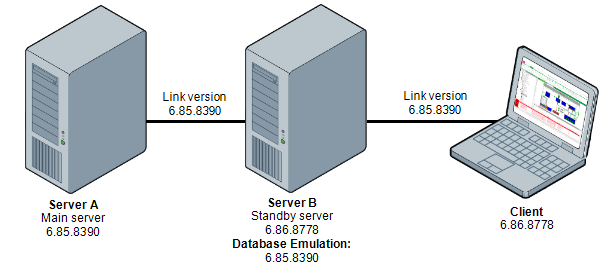
Both the client and Standby server have been upgraded, but the Main server is yet to be upgraded. The Main server is therefore running an older version of Geo SCADA Expert software than both the Standby server and the client. Database Emulation is enabled on the Standby server. The Standby server was previously running the same version of Geo SCADA Expert as the Main server, so that is the database version (6.85.8390) that the Standby server is emulating.
Users of the client that connects to the database via the Standby server can perform activities that result in proxy requests while the rest of the upgrade is in progress. This includes performing configuration-related changes and making control-type requests. However, as the older version of the database is being emulated on the Standby server to which the client is connected, users will only be able to work with the types of database items, features, and properties that exist in that older version of the database (6.85.8390).
This is because, as the client is connected to a Standby server that has Database Emulation enabled, the client sends requests in a format that is suitable for the older Geo SCADA Expert version 6.85.8390. When sending the requests, the client link version is compared to the Standby link version. Requests are permitted if the Standby link version is the same or newer than the client link version. The links are checked against both the minor version (such as 85) and the build number (such as 8390). In the above scenario, these checks succeed and the requests are passed on to the Main server, which is able to successfully receive and process the requests that are proxied from the client on the Standby server.
Once the remaining clients and servers on the system have been upgraded so that they are all running the same new version of Geo SCADA Expert software (6.86.8778), Database Emulation is deactivated on the Standby server. The client link version and Standby link version then change to 6.86.8778 and any requests that are proxied from the client on the Standby server are sent in this newer format. This means that the types of database items, features, and properties that are only available in the product version to which the system has been upgraded (6.86.8778) become available for use on the client that is on the Standby server.
Scenario 2 - The Standby server is running a newer version of Geo SCADA Expert software than the Main server. The client that connects to the Standby server is running the same newer version of software as the Standby server. The Standby server is emulating the server version of the Main server.
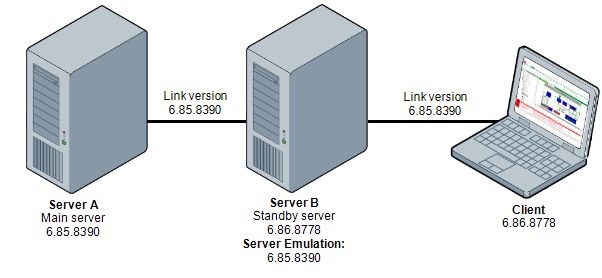
Both the client and Standby server have been upgraded, but the Main server is yet to be upgraded. The Main server is therefore running an older version of Geo SCADA Expert software than both the Standby server and the client. Server Emulation is enabled on the Standby server and is configured to emulate 6.85.8390, which happens to be the same version of Geo SCADA Expert software that is running on the Main server.
The reason that Server Emulation (rather than Database Emulation) is being used is that some of the other clients on the system are yet to be upgraded and are currently running the older version of software (6.85.8390). Using Server Emulation enables users to continue editing documents (such as Mimics and Trends) on any of those clients, regardless of which clients have been upgraded and which are yet to be upgraded (see Server Emulation). The emulation ensures that the document edits are stored in the format that is suitable for the older version of the software (6.85.8390) regardless of the version of software that is installed on the clients. That way, users can edit the documents on any client and those updated documents will continue to remain accessible from the other clients.
Users of the client that connects to the database via the Standby server can perform activities that result in proxy requests while the rest of the upgrade is in progress. This includes performing configuration-related changes and making control-type requests. As the client is connected to a server on which Server Emulation is enabled, the client sends requests in a format that is suitable for the older Geo SCADA Expert version 6.85.8390.
Once the remaining clients and servers on the system have been upgraded so that they are all running the same new version of Geo SCADA Expert software (6.86.8778), Server Emulation is deactivated on the Standby server. The client link version and Standby link version then change to 6.86.8778 and any requests that are proxied from the client on the Standby server are sent in this newer format. Edits to documents (such as Mimics and Trends) will now be saved in a format that is suitable for the newer Geo SCADA Expert version 6.86.8778. If there are any clients that have not been upgraded to that new version, users will not be able to view such edited documents on those older clients.
Scenario 3 - The Standby server is running a newer version of Geo SCADA Expert software than the Main server. The client that connects to the Standby server is running the same older version of software as the Main server. There is no emulation (either Database or Server).
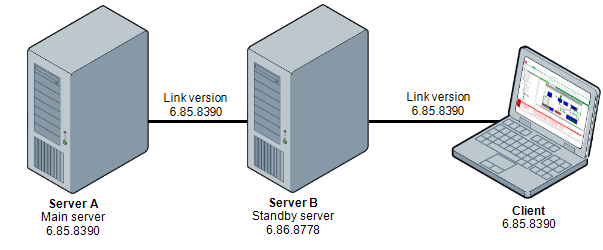
The Standby server has been upgraded and is running a newer version of Geo SCADA Expert software (6.86.8778). However, the client that connects to the Standby server is yet to be upgraded, as is the Main server. As such, both the client and Main server are running an older version of software (6.85.8390) than the Standby server. Database Emulation and Server Emulation are not in use.
Users of the client that connects to the database via the Standby server can perform activities that result in proxy requests while the rest of the upgrade is in progress. This includes performing configuration-related changes and making control-type requests. The client sends requests in the format that is determined by the older Geo SCADA Expert version 6.85.8390 that is running on that client. The Standby server passes those requests onto the Main server without modification. As the Main server is running the same older version of software as the client, it is able to process those requests successfully. This is because the requests are in the format that the Main server expects.
However, as the client is still running the older version of the software, users will only be able to work with the types of database items, features, and properties that exist in that older version of the database (6.85.8390).
Once the client and Main server have been upgraded to run the newer version of software (6.86.8778), the types of database items, features, and properties that are only available in that new version of software will become available for use on the client.
Scenario 4 - The Standby server is running a newer version of Geo SCADA Expert software than the Main server. The client that connects to the Standby server is running the same newer version of software as the Standby server. There is no emulation (either Database or Server).
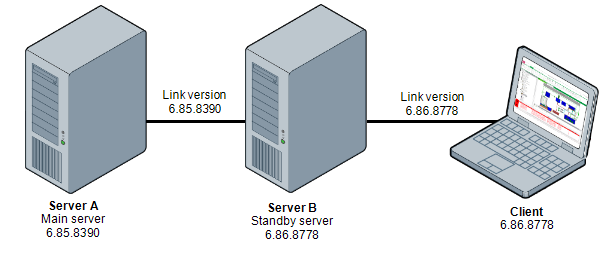
Both the client and Standby server have been upgraded, but the Main server is yet to be upgraded. The Main server is therefore running an older version of Geo SCADA Expert software than both the Standby server and the client. Database Emulation and Server Emulation are not in use.
With the above scenario, the client is unable to safely pass requests to the database on the Main server. Users of the client that connects to the database via the Standby server have to wait until the system upgrade is complete before they perform any activities that result in proxy requests. This includes performing configuration-related changes and making control-type requests.
The reason for this is that, as there is no emulation enabled, requests from the client are sent in a format that is suitable for the newer Geo SCADA Expert version 6.86.8778. However, as the Main server has not yet been upgraded, it is only able to process requests that are in the older 6.85.8390 format. As emulation is not is use, requests from the client are passed to the Standby server without modification, so are not in a format that the Main server can handle. The Standby server therefore rejects those requests due to it detecting that the Main server is running an older version of Geo SCADA Expert software that requires requests in a format that is suitable for that older version of software.
Attempts to proxy such requests will result in a diagnostic message such as:
Cannot proxy request to older server version.
Determine the link versions that are in use between machines
Whenever requests are proxied from a client on a Standby server through to the Main server, the client link version is compared to the Standby link version. Requests are only passed on if the Standby link version is the same or newer than the client link version. This includes checking both the minor version (such as 86) and the build number (such as 8778).
What if both Database Emulation and Server Emulation are enabled?
The server will use the lower of the two versions of Geo SCADA Expert software to the client.
For example, if Database Emulation is enabled and is emulating Geo SCADA Expert version 6.85.8390, and Server Emulation is enabled and is emulating version 6.84.8027, then the Link Version will be 6.84.8027.
If Database Emulation is enabled in addition to Server Emulation, the list of software versions that are offered for Server Emulation will only include versions up to and including the Database Emulation version. Once Database Emulation has been disabled, the list of software versions offered for Server Emulation will extend to include the version of Geo SCADA Expert software that is currently running on the server.
How do I ascertain the client link version?
You can ascertain the Link Version of the clients that are on a server by looking at:
-
The Server Links category that is located in the Server branch of the Server Status Tool on that particular server. Look at the entry in the Link Version column for rows on which the Client Name, User Name, or Workstation Name, columns indicate that they relate to a ViewX client.
-
The Comms Parent Links category that is located in the Server branch of the Server Status Tool on that particular server. Look at the entry in the Links Version column for rows on which the Conn Type is 'Other'. (This comprises connections that are not from servers or drivers, but are other connections such as those between the server and a ViewX client.)
You can also work out the client link version as whichever is the lowest of these version numbers:
-
The client version (that is, the version of Geo SCADA Expert that is installed on the ViewX client)
-
The server version (the version of Geo SCADA Expert that is installed on the server via which the client connects to the database)
-
The Database Emulation version (if in use on that server)
-
The Server Emulation version (if in use on that server).
How do I ascertain the Standby server link version?
You can ascertain the Link Version of a Standby server by looking at:
-
The Comms Parent Links category that is located in the Server branch of the Server Status Tool on the Main server. Look at the entry in the Links Version column for rows on which the Conn Type is 'Partner'. (This indicates that the entry relates to a connection between the local server and a partner Geo SCADA Expert server.)
-
The Server Links category that is located in the Server branch of the Server Status Tool on the Main server. Look at the entry in the Link Version column for rows on which the Type is set to 'SCXStandby' or 'SCXStandbySink'. (This comprises connections to and from the Standby servers.)
You can also work out the Standby server link version as whichever is the lowest of these version numbers:
-
The Server version (the version of Geo SCADA Expert that is installed on that Standby server)
-
The Database Emulation version (if in use on that server).
Further Information
Check the Version of your Geo SCADA Expert Software.
Types of Emulation Supported by Geo SCADA Expert.
Determine whether emulation is currently in use: see Types of Emulation Supported by Geo SCADA Expert.