Communications Logging Status on Lists
The Channels List uses color to indicate the Logging status of channels. The background color of each channel's row represents the logging status—if it is white (default settings), logging is disabled for the channel; if it is dark yellow/mustard (default settings), logging is enabled for the channel.
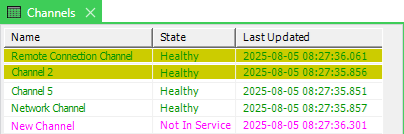
The change of color is a visual indication of logging being enabled. This can act as a reminder that logging needs to be disabled (it should only be enabled when you need to monitor communications).
For information on accessing Lists, see Display a List in the Geo SCADA Expert Guide to Lists.