Understand Comms and I/O Log Files
This topic applies to Comms and IO Log files. Advanced drivers support both types of log file. Those advanced drivers that support network or TCP/IP communications also support TLS log files (see Understand TLS Log Files).
Simple drivers have a hybrid type of log file that is a combination of IO and communications—these hybrid types of log file are also referred to as 'Comms logs'.
Each Comms or IO log file consists of two sections. The top (header) section contains information about the channel's settings, for example, the parity and flow control (if the channel has a Serial connection type). The bottom section contains the data packets and timestamps.
 Example of a Comms Log file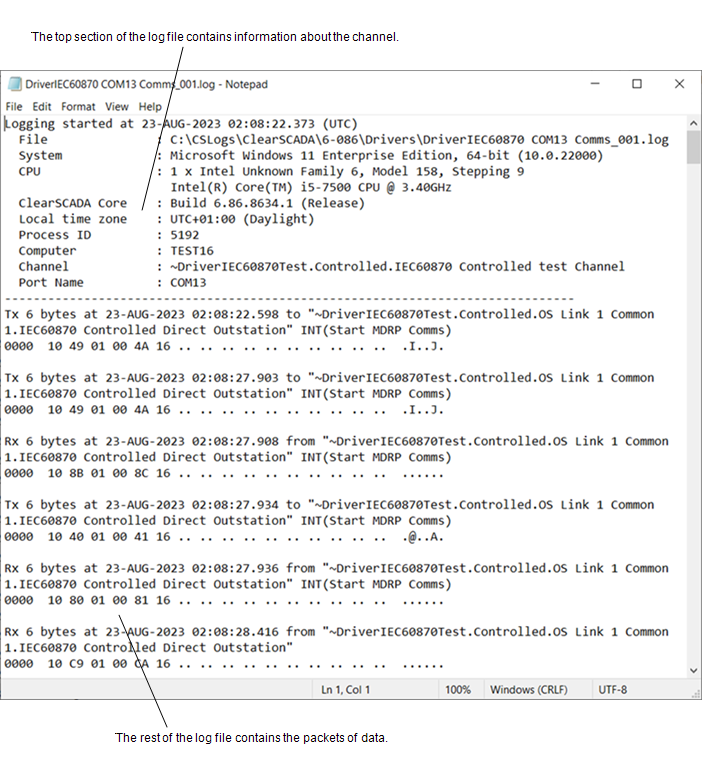
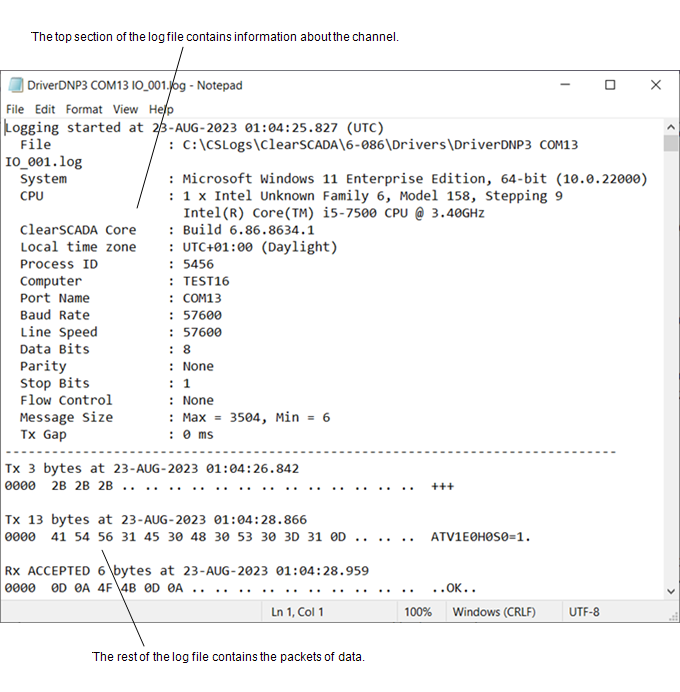
The packet entries that begin TX are the transmitted communication packets (the communications from the Geo SCADA Expert driver to the outstations, PLCs, and so on, that are connected to the selected channel).
The packet entries that begin RX are the received communication packets (the communications from the outstations, PLCs, and so on).
IO log files can contain a word after each TX or RX entry. The word describes the Geo SCADA Expert server’s response to the communication packet. The response can be:
- Rx ACCEPTED—The packet was read successfully.
- Rx REJECTED—The data was read but was discarded. Data is rejected if the packet is invalid, for example, if the data is in an unrecognized format.
- Rx FAILED—Geo SCADA Expert has recognized a packet as being correctly framed, but upon further investigation has detected a problem with the packet, for example, the checksum is invalid.
- Rx PURGED—A partial packet was read, but a parity error or timeout occurred before it was completed, so the port was purged.
- Tx PENDING—The driver is waiting to transmit the data because it is already transmitting data via the channel. This might occur when Geo SCADA Expert is transmitting data and receives new data at the same time—the driver might need to reply to the new data immediately but cannot because it is already transmitting data via the channel. The reply to the new data is 'pending' and will be sent as soon as the channel is available.
- Tx—The transmitted packets have no description after the TX.
If a translator is available for the driver, you can translate the messages in a log file into human readable format. For more information, see Translate a Comms or I/O Log File.