You can use the Geo SCADA Expert Installer’s Choose Setup Type page to choose from up to three different types of installation:
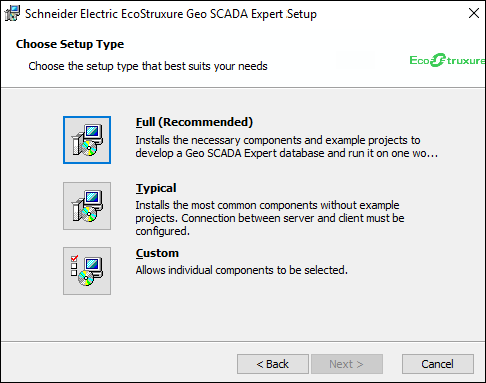
The Full (Recommended) option is only offered on Server and Server and Clients installations. Likewise, the Typical and Custom options only offer server components on Server and Server and Clients installations. With such installations, you have to install the Local Web Proxy group of prerequisites (see Geo SCADA Expert Prerequisite Components). If these prerequisites are required, but have not yet been installed, use the Back button on the Installation Wizard pages to go back to the Setup page and select the required prerequisites from that page.
Select Full (Recommended) to install Geo SCADA Expert server, Geo SCADA Expert Client, and Data Access components. The Full installation also includes example projects and many, but not all, of the supported drivers.
You can find out which components are included in Full Install.
Select Typical to install the most commonly used components for:
- A Geo SCADA Expert server and client
- A Geo SCADA Expert client only
- Data Access only (Web, ODBC, OLEDB, OPC, and COM access). With Geo SCADA Expert 2025 onwards, this also includes functionality to enable Python programs that are stored and executed outside of Geo SCADA Expert to interact with the Geo SCADA Expert database.
You can make your selection on the Typical Install page (see Typical Install).
Select Custom if you want to choose which components will be installed. You can make your selections on the Custom Setup page.
You have to use Custom if you want to install different components to those included in the Full or Typical installations.
Further Information