Install the Wonderware Alarm Provider Component
Geo SCADA Expert 2025 will be the last version of the product to support and include the Wonderware Alarm Provider driver.
If you want to view and manage Geo SCADA Expert alarms from within Wonderware InTouch, you have to:
-
Install the AVEVA Operations Control Logger prerequisite (see Geo SCADA Expert Prerequisite Components).
-
Install the Geo SCADA Expert Wonderware Alarm Provider component in the Installation wizard (see below).
-
Enable the Wonderware Alarm Provider Driver using the Server Configuration Tool.
You can perform these steps when you first install Geo SCADA Expert (see Installing Geo SCADA Expert) or you can modify your existing installation (see Making Changes to your Geo SCADA Expert Installation).
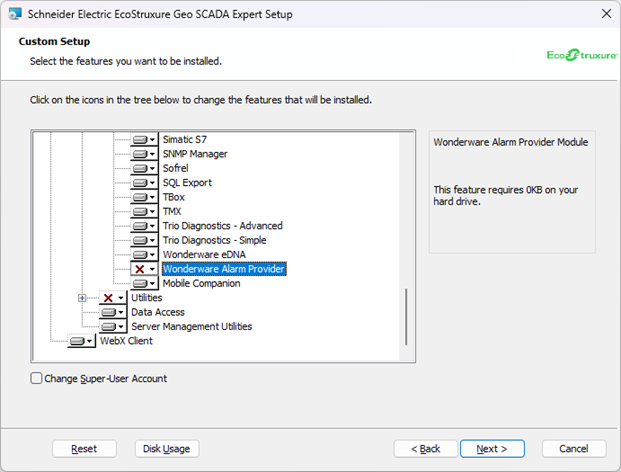
When you perform a Full or Typical Geo SCADA Expert installation, the Geo SCADA Expert installer does not automatically install the Wonderware Alarm Provider component. You have to do a Custom installation and manually select the component.
You can find the Wonderware Alarm Provider component in the Server section of the Custom Setup page of the Geo SCADA Expert Installer Wizard. The component is only listed if the AVEVA Operations Control Logger prerequisite is installed.
Further Information
Install a Driver in Geo SCADA Expert in the Geo SCADA Expert Guide to Drivers.
Managing Geo SCADA Expert Alarms in Wonderware InTouch.
Configure Wonderware InTouch to Access Database Alarms.
How Geo SCADA Expert Alarm Fields are Mapped to Wonderware InTouch Alarm Fields.