When Geo SCADA Expert processes historic data, it performs calculations on the raw values to create the engineering values. You can also include the modified values so that the engineering values are the results of calculations on both the raw values and the modified values.
There are three types of historic data:
- Raw values—The values that are reported by plant and so on. These are the values that Geo SCADA Expert receives.
- Processed values—Values that are calculated by Geo SCADA Expert. These values are the result of a calculation that Geo SCADA Expert performs on the raw values (and also modified values, if selected).
- Modified values—Values that are created manually by a user.
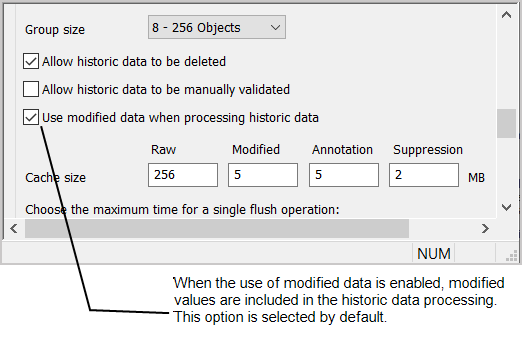
To change the Use modified data when processing historic data setting:
- Access the Geo SCADA Expert Server Configuration Tool.
- Expand the Historic Configuration branch.
- Select the Historic Data entry.
- Either:
- Select the Use modified data when processing historic data check box to include modified values in the historic data processing. The Use modified data when processing historic data check box is selected by default.
Or:
- When you clear the Use modified data when processing historic data check box, the modified data is excluded from the processing. The engineering values will be the results of calculations performed on the raw values only.
- Select the Use modified data when processing historic data check box to include modified values in the historic data processing. The Use modified data when processing historic data check box is selected by default.
- Apply the changes to the server.
Now that you have selected or cleared the Use modified data when processing historic data setting, you can either proceed to configure other Historic settings (see Historic Configuration Settings) or you can continue with the server configuration.