You use a separate licensing mechanism for Virtual ViewX (see License your Virtual ViewX Installation).
The License Details window on a Geo SCADA Expert server provides information about your license settings and the drivers, database items, clients, and so on, that are permitted on your system.
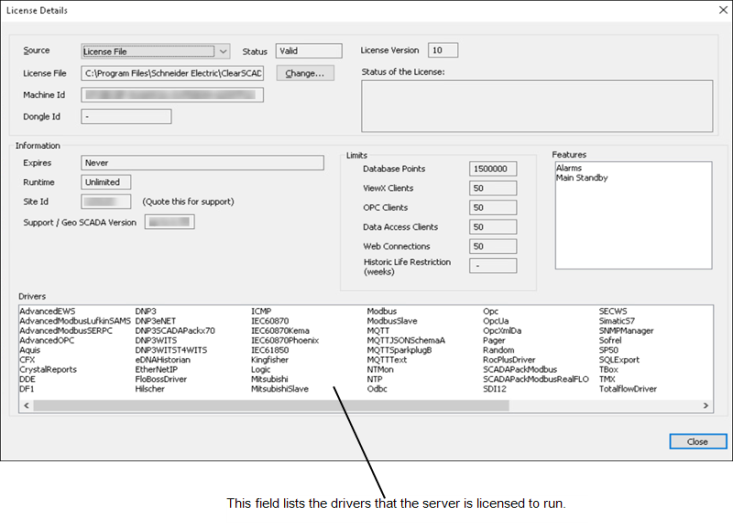
The License Details window displays the following information:
- Source—Indicates whether your system uses a license file, an AVEVA Enterprise License Server, or a dongle license.
Only set the license type using the Source field's combo box when it is necessary to do so. Do not use the combo box to 'browse' the various license types on a 'live' system. Inadvertently switching to a different type of license might cause a current valid license to be deactivated.
- Status—Displays the status of the license.
- License File—Indicates the location of the license file. By default this is:
C:\Program Files\Schneider Electric\ClearSCADA\ClearSCADA.lic.You can use the Change button to display a window from which you can specify a different location for the license file (see Associate a Geo SCADA Expert Server with a License File).
- License Version—Indicates the version number of the license file (if a license file is being used). The version number is used to validate the license and relates to the license features. The license file that we provide you with has a version number that is compatible with your system.
The License Version field is empty if a dongle or AVEVA Enterprise License Server is being used.
- Machine Id—Displays the unique identifier of the server machine.
- Dongle Id—Displays the identification number of the dongle (if a dongle is being used).
- Status of the License—Displays a description of the status of the license to highlight license restrictions that the current configuration has exceeded, or limitations of a demonstration license. This field is blank if the existing license is valid and operating as expected.
Information section:
- Expires—Indicates the date and time at which the license expires (becomes invalid).
- Runtime—Displays the number of hours for which the system will continue to run. The license specifies this limit.
- Site Id—Displays the unique identifier that is associated with your support contract (providing that your license agreement includes customer support). When contacting the Schneider Electric Support team with a query, please provide them with this Site Id.
The Site Id is also available from the 'Information' page of the Server Status Tool (see Information).
- Support / Geo SCADA Expert Version—Displays the number of the software version that the server is licensed to run.
Limits section:
- Database Points—Indicates the maximum number of database points that the database can include.
Accumulators, variables, and parameters can be used without licenses, so do not affect the number of points remaining on your points license. Other types of point, such as standard database points and internal database points need to be licensed.
Points in Group Templates do not require licenses, as they are ‘configuration models’ and are not used to store data in the database. However, points in Group Instances do require licenses.
- ViewX Clients—Displays the number of ViewX clients that can be connected to the server. The license specifies this limit.
Be aware that if you also run Virtual ViewX, the Virtual ViewX server itself requires a ViewX client license. This is a single license for connection to multiple systems, and can be a dongle or license file. For more information, see License your Virtual ViewX Installation.
On a server on which the Local ViewX Only option is active, this field will contain 0 (zero). For more information about this option, see the Features field below.
- OPC Clients—Indicates the number of OPC clients that can be connected to the server. An OPC client license is needed for each connection between the Geo SCADA Expert database and an OPC or OPCHDA interface. The license specifies this limit. For more information, see Associate a Third-Party OPC Client - System with an OPC License.
- Data Access Clients—Shows the number of data access clients that can be connected to the server. A data access client license is needed for each connection between the Geo SCADA Expert database and an ODBC or automation interface, including .NET and COM. A data access client license is also needed on each Geo SCADA Expert server that is to provide access to the Geo SCADA Expert database from mobile devices. The license specifies this limit. For more information, see Associate a Third-Party ODBC Client - System with a Data Access License, and see Associate a Third-Party OLEDB Client with a Data Access License.
- Web Connections—Indicates the number of Original WebX clients that can be connected to the server. A web connection license is needed for each connection between the Geo SCADA Expert database and a http:// or https:// interface. The license specifies this limit.
You can define an Idle Period after which a web connection license becomes available for use by another Original WebX client session after a user ends their session by closing the browser window, rather than by logging off. For more information, see Define the Idle Period Timeout for Original WebX Links.
Be aware that if any Mimics on your system are configured to have cross-database hyperlinks, access to the 'target' documents via such hyperlinks will require an Original WebX client license for a server in the system that contains the 'target' documents (in addition to an Original WebX client license for the server on which the Mimic itself is located).
Example:
An Original WebX client license for Server A will be required to display a Mimic that is on Server A. The Mimic on Server A contains a hyperlink to document that is on another Geo SCADA Expert database. The other Geo SCADA Expert database is on Server B. To access the document on Server B via the hyperlink that is on the Mimic on Server A, the Original WebX client will require a license for Server B. In each case, the Original WebX client only uses the relevant license while it is accessing the Geo SCADA Expert database to which the license relates.
For more information on cross-database hyperlinks, see Understanding Hyperlinks and 'Chained' Displays and see Cross-Database Hyperlinks for Original WebX Clients. Both are topics in the Geo SCADA Expert Guide to Mimics.
-
Historic Life Restriction (weeks)—Indicates the number of weeks for which you can store historic data on the server. The license configuration specifies this limit. The limit range is 1 to 255 weeks inclusive. 0 is the default value and implies unlimited historic life.
If any of the configured historic data point lives exceed the licensed limit, the server's license is deemed insufficient for that server and the server's operation halts. You will be prompted to reconfigure the properties in the Historic Data section in the Server Configuration tool to meet the license restriction, or apply a less restrictive license. No historic point data is deleted until the configured historic data point lives are reduced to meet the license restriction (see Historic Data Storage Settings).
The affected limits comprise the historic data Keep online for, the three Alternatives, the Modified data writeable for, and the Annotation data writeable for properties.
Features section:
- Features—This section lists the features or restrictions that are applied via the server license.
- Main Standby—Indicates that the license allows the server to be part of a multi-server system.
The absence of this entry indicates that a stand-alone server configuration is supported, rather than a multi-server configuration.
- Local ViewX Only—Indicates that a restriction exists to limit the connection of ViewX from the server's host. This restricts the ViewX license to just a locally installed ViewX client on the same host as the Geo SCADA Expert server. This restriction might be applied to a server license. It is also applied automatically if you opt to use the restrictive '100-Point Indefinite Demo' license on a new installation of Geo SCADA Expert.
The absence of this entry indicates that there is no restriction, a local count of ViewX licenses could be deployed and ViewX connections using client licenses is possible.
The omission of any of the above entries from this field indicates that the server is not licensed for those particular features.
- Main Standby—Indicates that the license allows the server to be part of a multi-server system.
Drivers section:
- Drivers—Indicates the drivers that the server is licensed to run on your system.
If your license file is in an appropriate location and you have finished viewing the License settings, you can continue with the server configuration. If you are unfamiliar with the server configuration process, we recommend that you proceed to learn how to Start and Stop the System Server.
Further Information
License requirements for Geo SCADA Mobile: see the separate Geo SCADA Mobile documentation suite.