This page of the Installation Wizard is only displayed when you install Geo SCADA Expert for the first time on a machine.
When you install Geo SCADA Expert for the first time on a machine, the server will start in demonstration mode as no license has been attached yet.
If you have a license for the server, or if you intend to use the example projects, you can move directly to the next page of the Installation Wizard. To do this, ensure that the Enable 100-Point Indefinite Demo License check box is clear, and click Next. Refer to Server License Settings - Geo SCADA Expert for more information on how you can add a license file for the server.
If you do not have a license for the server, you can use the Geo SCADA Expert Installer's Clean Installation of Database window to select the type of demonstration license that you want to use.
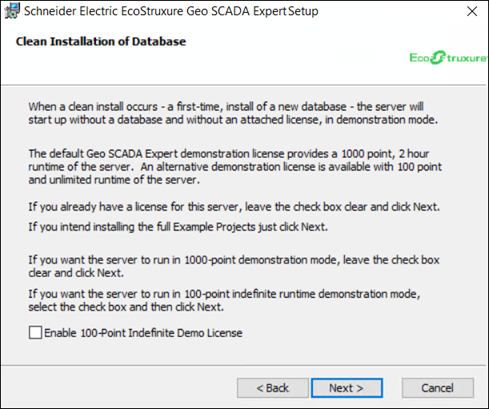
There are two types of demonstration licenses that you can opt for:
-
The default demonstration license which runs for 2 hours, and restricts your system to a maximum of 1000 configurable database points. With this license, you will have to restart the server every 2 hours.
Keep the Enable 100-Point Indefinite Demo License check box clear, and click Next, if you want to use the default 1000-point demo license.
-
An alternative demonstration license which runs indefinitely, but restricts your system to a maximum of 100 configurable database points. This option also restricts the ViewX license to be 'Local ViewX Only'. This means that the license is restricted to just a locally installed ViewX client on the same host as the Geo SCADA Expert server.
Select the Enable 100-Point Indefinite Demo License check box, and click Next, if you want to use the 100-point indefinite demo license.
While using the 100-point indefinite demo license, if the point count of the database exceeds 100, then the license will revert to the default 1000-point demo license with a 2-hour limit.