The Server Status Tool contains statistical and diagnostic information that you can use to assess your system and investigate unexpected system behavior. You can only log on to the tool using a User Account that is assigned the System Admin security permission for the Root Group (system).
To run the Server Status Tool:
- On the Geo SCADA Expert server, right-click on the Geo SCADA Expert Server icon in the Windows taskbar.

A context-sensitive menu is displayed.
- Select the Status option.
The Geo SCADA Expert Server Status Tool is displayed. -
Select the required System from the tree-structure that is shown on the left-hand side of the Geo SCADA Expert Server Status Tool.
-
When prompted to log on, enter your Username and Password to log on to the system in the same way as you would log on to ViewX.
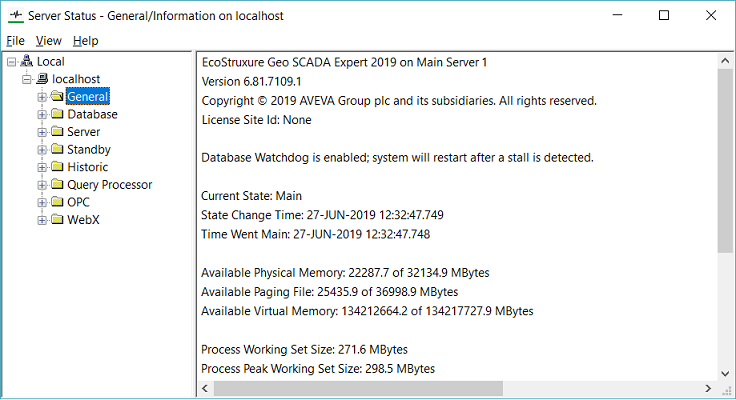
Alternatively, access the Server Status Tool as follows:
- In Windows, select the Start menu. Scroll down the alphabetical list of installed applications and expand the EcoStruxure Geo SCADA folder.
- Select the Server Status option.
The Geo SCADA Expert Server Status Tool is displayed. - Select the required System from the tree-structure that is shown on the left-hand side of the Geo SCADA Expert Server Status Tool.
- When prompted to log on, enter your Username and Password to log on to the system in the same way as you would log on to ViewX.
Alternatively, you can also access the Server Status Tool from the ViewX ribbon, as follows:
- Launch the Geo SCADA Expert ViewX.
- On the ViewX ribbon, double-click the Server Status icon.
The Geo SCADA Expert Server Status Tool is displayed. - Select the required System from the tree-structure that is shown on the left-hand side of the Geo SCADA Expert Server Status Tool.
- When prompted to log on, enter your Username and Password to log on to the system in the same way as you would log on to ViewX.
If you are unfamiliar with the Server Status Tool, see Overview of the Server Status Tool.
If you are familiar with the Geo SCADA Expert Status Tool, refer to the section you require: