ATTENTION: This topic relates to the deprecated Original WebX client that is supported by this and previous versions of Geo SCADA Expert. Geo SCADA Expert 2025 will be the last version of the product to support and include the deprecated Original WebX client. For web client support, please use Virtual ViewX clients instead of Original WebX clients. For information about the Virtual ViewX client, click here.
The WebX interface consists of two parts:
- A navigation bar with a row of buttons at the top of the window.
- A main display area below the buttons.
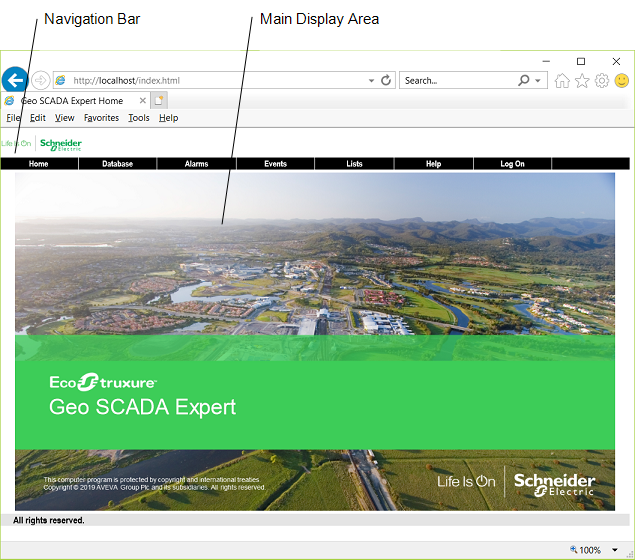
The WebX interface navigation bar contains a number of buttons that you use to access your system. You select a button to access the next page or display for that particular feature. The buttons that are shown vary, depending on the access assigned to your user account, but comprise a combination of the following:
- Home—Select this button to display your Geo SCADA Expert home page. This is equivalent to the Home command on the ViewX ribbon's Home Tab.
- Database—Select this button to display the System web page or default views that provide hyperlinks to the groups and items in your system. This is equivalent to the Database Bar. You can view an item’s properties (see View an Item’s Status on a WebX Client). You can display Mimics, Trends, and so on, in the main display area (see Browse your Database on a WebX Client).
- Documents—Select this button to access your operator document stores. This is equivalent to accessing your documents via the Operator Documents Bar in ViewX (see Access Your Operator Document Stores on a WebX Client).
- Alarms—Select this button to display a list of the current alarms on your system, automatically refreshed every 5 minutes. You can use the Alarms List to view and manage Alarms (equivalent to the Alarms command on the ViewX ribbon's Home tab). For more information, see View and Action Alarms on a WebX Client.)
- Events—Select this button to display a list of the events on your system (equivalent to the Events command on the ViewX ribbon's Home tab). For more information, see View and Action Events on a WebX Client.)
- Lists—Select this button to display the Lists web page, which provides hyperlinks to the Lists in your system. This is equivalent to the Queries Bar in ViewX. You can use the Lists to view the values of items of the same type, for example, view the values of the points on your system. For more information, see View and Action Lists on a WebX Client.
- Favorites—Select this button to access your Favorites list. This is equivalent to accessing your Favorite displays from the Favorites Bar in ViewX. As WebX is only able to display one window at a time, any Favorites that comprise multiple windows, or windows and inset windows, will be omitted from the Favorites list in WebX. For more information, see Favorites.
- Help—Select this button to display comprehensive information about Geo SCADA Expert system operation, configuration and management. See Welcome to Geo SCADA Expert Help.
You cannot access the Geo SCADA Expert context-sensitive help feature from a WebX client. In the ViewX client, the context-sensitive help feature allows you to display help for the Geo SCADA Expert display that you are currently using. See Context Sensitive Help.
To display context-sensitive help in the ViewX client (and in many other Windows® applications) you press the F1 key. If you press F1 in the WebX client, then context-sensitive help for the browser appears, rather than context-sensitive help for the Geo SCADA Expert application.
- Log On/Log Off—Select this button to display the log on page, which allows you to log on to your system or log off via the WebX client. This is equivalent to logging on via the Database Bar’s system icon in ViewX (see Log On to a WebX Client).