Event Configuration
Each SCADAPack x70 Device that is operating as a DNP3 Outstation can support up to three DNP3 Controlling Stations (see Configure the Connection to the Controlling Station). Any (or none) of the DNP3 Controlling Stations can comprise Geo SCADA Expert, or a third-party controlling station.
When a DNP3 device sends event data to a DNP3 Controlling Station, each event is sent in a format known as a DNP3 Object. The DNP3 standard specifies Groups and Variations, which define the type and format of the data that is sent between DNP3 devices. For example, Group 2 is defined in the DNP3 standard as a binary input event object and is used to send binary input event data between DNP3 devices. Group 2, Variation 1 is defined as a binary input event object with no time stamp, while Group 2, Variation 2 is defined as a binary input event object with a time stamp. DNP3 Groups/Variations are usually written in abbreviated notation. For example, Group 2 Variation 1 is written as g2v1.
When a DNP3 event object with a time stamp is specified, the time stamp for the event is applied by the SCADAPack x70 device at the time the event occurs. When these events are received by a DNP3 Controlling Station that comprises Geo SCADA Expert, the Geo SCADA Expert server stores the values in its historic database, using the time stamp supplied in the event object. When a DNP3 event object with no time stamp is specified, the values are stored in the Geo SCADA Expert history database using the system time of the Geo SCADA Expert server at the time the events are received by the Geo SCADA Expert server.
Use the fields within the Event Configuration section of the DNP3 Outstation tab to specify the DNP3 event objects that the outstation uses to send event data to its DNP3 Controlling Stations(s).
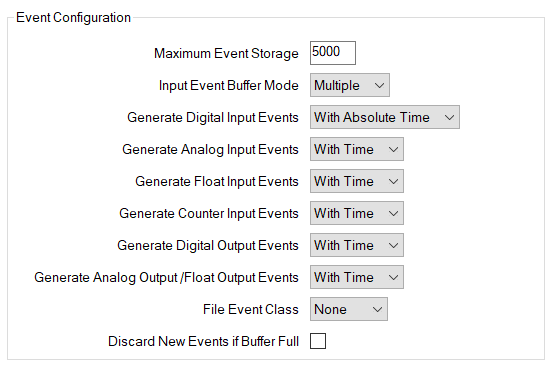
Each Events field is a drop-down list. Select one of the DNP3 event objects supported by the SCADAPack x70 device.
We recommend that you choose With Time events, so that Geo SCADA Expert logs the data using its original occurrence time, rather than the time that the event arrives at the server.
Specify the maximum number of events, regardless of type, that the outstation can store. The minimum value is 0, the maximum value is 100000, and the default setting is 5000.
A value that is greater than 40000 might not get written correctly to a SCADAPack x70 device that is running a firmware version that is earlier than R2.8.4.
If the number of events generated exceeds the configured amount, then the SCADAPack x70 generates an Event Buffer Overflow Alarm. Oldest events are discarded first.
Use to specify whether or not the outstation buffers multiple analog input, floating point, and counter events, or whether the DNP3 Outstation overwrites existing events with a more recent event for the same point. Choose from:
The outstation buffers multiple events for each analog input, floating point, or counter point that is generating events. Buffered events have to be timestamped for the DNP3 Controlling Station to process them. If you select this mode you need to select the appropriate 'With Time' option. For analog input events and float events, set the General Analog Input Events setting to 'With Time'. For counter input events and frozen counter events, set the Generate Counter Input Events setting to 'With Time'.
This is the default setting.
The outstation only buffers the last event that was generated for each analog input, floating point, or counter that can generate events.
The DNP3 Outstation overwrites any existing event that already exists in the event buffer for an analog input, floating point, or counter input that generates a new event. Events may exist for multiple points in the event buffer, but only one event per point is buffered.
Specify the DNP3 event object that the SCADAPack x70 device uses to send digital input point event data to its DNP3 Controlling Station(s). Digital input events are also known as DNP3 binary input events. Choose from:
Use this setting to generate DNP3 group 2, variation 1 digital input event objects when timestamps are not required, or when a third-party DNP3 Controlling Station does not support timestamped digital events. When Geo SCADA Expert is a DNP3 Controlling Station, it stores the events in the history database using the time they arrive at the Geo SCADA Expert server. Not recommended, as the actual occurrence time is lost.
The outstation does time stamp the event data. When Geo SCADA Expert is a DNP3 Controlling Station, it stores the events in the history database using the time stamp applied by the outstation.
Use this setting to generate DNP3 group 2, variation 2 digital input event objects when a third-party DNP3 Controlling Station supports timestamped digital events, but does not support relative time objects.
This is the default setting.
The outstation time stamps the event data. When Geo SCADA Expert is a DNP3 Controlling Station, it stores the events in the history database using the time stamp applied by the outstation.
Use this setting to generate DNP3 group 2, variation 3 digital input events when the DNP3 Controlling Station supports relative time timestamps and DNP3 group 51, variation 1 and variation 2 CTO objects.
This option produces more efficient communications on a SCADAPack x70 device that regularly produces more than a few binary events every minute (either continuously, or in bursts).
Specify the DNP3 event object that the SCADAPack x70 device uses to send integer analog input event data to its DNP3 Controlling Station(s).
The DNP3 Outstation automatically determines 16-bit or 32-bit event size for each point based on its DNP3 Static Group and Variation setting. Choose from:
Use this setting for integer analog input events when a third-party DNP3 Controlling Station does not support, or a DNP3 Controlling Station does not require, timestamped analog events.
The outstation does not time stamp the event data. When Geo SCADA Expert is a DNP3 Controlling Station, it stores the events in the history database using the time that the events arrive at the Geo SCADA Expert server and not the actual occurrence time of the event.
- 16-bit integer analog output events with no time are sent as DNP3 group 32, variation 2 objects.
- 32-bit integer analog output events with no time are sent as DNP3 group 32, variation 1 object.
Use this setting for integer analog input events when the DNP3 Controlling Station supports timestamped analog events.
The outstation time stamps the event data. When Geo SCADA Expert is a DNP3 Controlling Station, it stores the events in the history database using the time stamp applied by the outstation.
This is the default setting.
- 16-bit integer analog output events with time are sent as DNP3 group 32, variation 4 objects.
- 32-bit integer analog output events with time are sent as DNP3 group 32, variation 3 objects.
Specify the DNP3 event object that the outstation uses to send floating point event data to its DNP3 Controlling Station(s). Choose from:
Analog event data is sent to each DNP3 Controlling Station as IEEE short floating point (32-bit) precision. The outstation does not time stamp the event data. When Geo SCADA Expert is a DNP3 Controlling Station, it stores the events in the history database using the time they arrive at the Geo SCADA Expert server. Not recommended, as the actual occurrence time is lost.
- 32-bit floating point analog input point events with no time are sent as DNP3 group 32, variation 5 events.
Analog event data is sent to as IEEE short floating point (32-bit) precision. The outstation time stamps the event data. When Geo SCADA Expert is a DNP3 Controlling Station, it stores the events in the history database using the time stamp applied by the outstation.
- 32-bit floating point analog input point events with time are sent as DNP3 group 32, variation 7 events.
This is the default setting.
Specify the DNP3 event object that the outstation uses to report counter input and frozen counter events in an unsolicited response or event class poll response to its DNP3 Controlling Station(s). The DNP3 Outstation automatically determines 16-bit or 32-bit event size for each point, based on its DNP3 Static Group and Variation setting. Choose from:
Use this setting for counter events when a third-party DNP3 Controlling Station does not support, or a DNP3 Controlling Station does not require, timestamped counter events.
- 16-bit integer counter events with no time are sent as DNP3 group 22, variation 2 objects.
- 32-bit integer counter events with no time are sent as DNP3 group 22, variation 1 object.
- 16-bit frozen counter events with no time are sent as DNP3 group 23, variation 2 objects.
- 32-bit frozen counter events with no time are sent as DNP3 group 23, variation 1 object.
Use this setting for counter events when the DNP3 Controlling Station supports timestamped counter events.
The outstation time stamps the event data. When Geo SCADA Expert is a DNP3 Controlling Station, it stores the events in the history database using the time stamp applied by the outstation.
This is the default setting.
- 16-bit integer counter events with time are sent as DNP3 group 32, variation 6 objects.
- 32-bit integer counter events with time are sent as DNP3 group 32, variation 5 objects. This is the default setting.
- 16-bit frozen counter events with time are sent as DNP3 group 23, variation 6 objects.
- 32-bit frozen counter events with time are sent as DNP3 group 23, variation 5 objects.
The DNP3 standard specifies that analog values are signed, and counter values are unsigned. As such, the value returned by Analog Input Events (16-bit) has the range from -32768 to 32767 inclusive, and Analog Input Events (32-bit) has the range from -2147483648 to 2147483647 inclusive. The value returned by Counter Input Events (16-bit) and Frozen Counter Input Events (16-bit) has the range from 0 to 65535 inclusive. The value returned by Counter Input Events (32-bit) and Frozen Counter Input Events (32-bit) has the range from 0 to 4294967295 inclusive.
Specify the DNP3 event object that the SCADAPack x70 device uses to send binary output event data to its DNP3 Controlling Station(s). Choose from:
The outstation does not time stamp the event data and generates DNP3 group 11, variation 1 digital output event objects when timestamps are not required or when a third-party DNP3 Controlling Station does not support timestamped digital events. When Geo SCADA Expert is a DNP3 Controlling Station, it stores the events in the history database using the time they arrive at the Geo SCADA Expert server and not the actual occurrence time of the event.
If a DNP3 Controlling Station does not support digital output event objects, set the Point Data Class for each point to Local or Class 0.
The outstation does time stamp the event data and generates DNP3 group 11, variation 2 digital output event objects when a DNP3 Controlling Station supports digital output events with timestamping. When Geo SCADA Expert is a DNP3 Controlling Station, it stores the events in the history database using the time stamp applied by the outstation. This is the default setting.
Specify the DNP3 event object that the SCADAPack x70 device uses to send integer analog output and float analog output events in an unsolicited response or event class poll response to its DNP3 Controlling Station(s). The DNP3 Outstation generates events compatible with the analog output point's DNP3 Static Group and Variation setting. Choose from:
The outstation does not time stamp the event data. When Geo SCADA Expert is a DNP3 Controlling Station, it stores the events in the history database using the time they arrive at the Geo SCADA Expert server and not the actual occurrence time of the event.
- 32-bit integer analog output events are sent as DNP3 group 42, variation 1 events.
- 16-bit integer analog output events are sent as DNP3 group 42, variation 2 events.
- 32-bit short floating point analog output events are sent as DNP3 group 42, variation 5 events.
The outstation does time stamp the output event data. When Geo SCADA Expert is a DNP3 Controlling Station, it stores the events in the history database using the time stamp applied by the outstation.
- 32-bit integer analog output events are sent as DNP3 group 42, variation 3 events.
- 16-bit integer analog output events are sent as DNP3 group 42, variation 4 events.
- 32-bit short floating point analog output events are sent as DNP3 group 42, variation 7 events.
This is the default setting.
Specify the event class in which a DNP3 File Status event is generated. You can select from the following options:
- None
- Class 1
- Class 2
- Class 3 -This is the default and recommended setting.
If the outstation has previously opened a file from a DNP3 File Open request, but has then automatically closed it due to inactivity, the DNP3 standard requires that the outstation generates a File Status event to report that it closed the file.
Select this check box if the SCADAPack device is to stop adding events to the local buffer and to discard any new events if the buffer is full. The events that are already in the buffer are saved.
Clear the check box if the SCADAPack x70 device is to discard the oldest events that are already in the buffer in order to make room to add new events, when the event buffer is filled. This is the default setting.