Configure Ethernet Ports
The IP Communications tab on the Form of a SCADAPack x70 Device Configuration item includes an Ethernet Ports section. Use the section to define the address of each port and the default gateway(s) used by each Ethernet port. On a SCADAPack 47xi device, you can also specify whether any of the Ethernet ports are to be used for port forwarding.
The number of Ethernet ports varies, depending on the range to which the SCADAPack x70 device belongs. Port Forwarding and Edge functionality are only available for use, and supported on, SCADAPack 47xi devices.
 Figure Showing the Ethernet Ports on a SCADAPack 47x Device: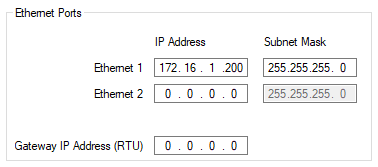
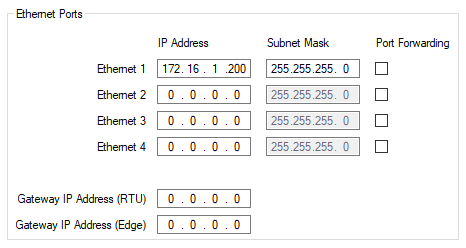
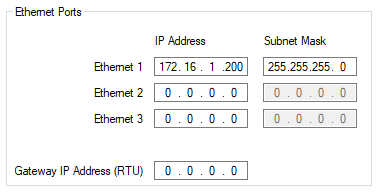
For each Ethernet port you can configure the following:
The IP address for the Ethernet port on the SCADAPack x70 device.
Each Ethernet port needs to be on a different subnet.
The subnet mask for the Ethernet port.
These check boxes only apply to a SCADAPack 47xi device. Use each check box to specify whether the Ethernet port is used for port forwarding. Port forwarding usage differs, depending on the Ethernet port.
Select the appropriate check box to use that particular Ethernet port for port forwarding. You can use Ethernet ports 1 and 2 for Edge forwarding; when enabled, this allows access to the RTU platform Ethernet interfaces from Edge interfaces or Edge services. You can use Ethernet ports 3 and 4 for RTU forwarding; when enabled, this allows access to the respective Ethernet port(s) from RTU interfaces or RTU services.
Clear the appropriate check box (the default) if the Ethernet port is not used for port forwarding.
Use the Gateway IP Address field(s) to configure the IP address(es) of the default gateway node through which IP communications pass if no other path can be determined for an IP address.
If the Ethernet port subnets, PPP port subnets or IP Routing Table specifies a route for an RTU IP address, the communication is routed through the default gateway node.
If this device and the device at the other end of the connection are on the same subnet, you do not need to define a default Gateway IP Address here or a route in the IP Routing Table. This default gateway IP address must be an IP address on a subnet for an interface configured on this SCADAPack x70 device.
If you define a gateway node and you want it to be available for a specific subnet, add a route to the IP Routing Table (see Add and Configure the Entries in an IP Routing Table).
This property only applies to a SCADAPack 47xi device. If the Ethernet port subnets, PPP port subnets or IP Routing Table specifies a route for an Edge IP address, the communication is routed through the default gateway node.
If this device and the device at the other end of the connection are on the same subnet, you do not need to define a default Gateway IP Address here or a route in the IP Routing Table. This default gateway IP address must be an IP address on a subnet for an interface configured on this SCADAPack x70 device.
If you define a gateway node and you want it to be available for a specific subnet, add a route to the IP Routing Table (see Add and Configure the Entries in an IP Routing Table).
Further Information
Specify which points are exposed to the Edge application processor: see Properties that are Common to Configuration Items.
Add and Configure the Entries in an Edge Firewall Table.
For information about the Ethernet interfaces, including any limitations and recommendations, see the documentation provided with the SCADAPack x70 device.