Geo SCADA Expert provides three distinct options for logging on to a Virtual ViewX client. Each logon option is designed to provide a secure authentication experience to suit your company's preferences and security requisites. A system administrator will be able to advise you as to which option your system and User Account is set up to use. Based on the system configuration and your User Account's setup, you will log on to a Virtual ViewX client using one of the following options:
- Standard logon—This is the traditional way of logging on to a Virtual ViewX client using your User Account. To gain access to the database, you enter a valid user name and password. Standard logon includes Geo SCADA Expert External Authentication with either Active Directory or LDAP. These login types require a password to be entered, which is authenticated with an external system.
- Two-factor authentication (2FA)—This is an extension to the standard logon. This logon option requires two steps of verification before you can gain access to the database. In addition to a user name and a password, you must authenticate using a second factor. This comprises a one-time password that you obtain from a third-party authenticator that you have installed on a device such as a smartphone. If your User Account is configured to use two-factor authentication (2FA), you must enroll using a third-party authenticator app (see Enroll for Two-Factor Authentication). You then use the authenticator account that gets created to generate each one-time password that you require for authentication along with your username and password each time that you log on thereafter.
- Single sign-on (SSO)—This logon option enables you to gain access to Geo SCADA Expert using the same logon credentials that you use to access other AVEVA services via SSO in your company. Unlike the other logon options, with this option you log on by selecting an SSO button, rather than by entering a username and password. This logs you onto the database using your existing logon credentials. The SSO logon option is available only when all of the following apply:
- The PCS framework is installed and configured
- The Geo SCADA Expert servers have the AVEVA Identity Manager token-based authentication feature enabled
- The Virtual ViewX client is configured to use SSO
Additionally, for SSO to be functional, a system administrator has to configure Virtual ViewX to use Single Sign-on
- The PCS framework is installed and configured
The single sign-on logon option is only supported from Geo SCADA Expert 2023 onwards. You cannot use 2FA in conjunction with SSO.
User Accounts in Geo SCADA Expert are designed to be allocated to individual members of staff. User Accounts have:
- User names and passwords—
If your User Account is configured to use SSO, you do not need to enter the user name and password to log on. Instead, Geo SCADA Expert uses Windows Integrated Login to log on to a Virtual ViewX Client.
- Permissions—Each User Account can be allocated permissions, which affect the items and features that are available. For example, your User Account may allow you to view data, but prohibit you from configuring database items.
A system administrator might update your permissions if access requirements change. If so, the updates to your User Account will come into effect the next time that you log on.
To use a Virtual ViewX client to interact with Geo SCADA Expert, you have to log on via a user account (just like with ViewX clients).
You cannot use the built-in Guest or Super User accounts to log on to a Virtual ViewX client
 Standard Logon
To log on to a Virtual ViewX client:
- Run the Virtual ViewX client in a browser window (see Run a Virtual ViewX Client ).
- Press the Enter key.
The initial Virtual ViewX page is displayed.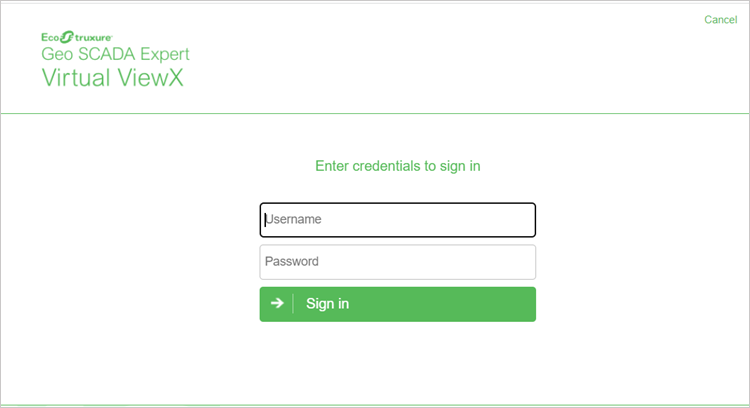
- Enter your Username and Password.
With a Virtual ViewX client that is configured to connect to just one Geo SCADA Expert database, enter your Username and Password.
With a Virtual ViewX client that is configured to connect to multiple Geo SCADA Expert databases, perform one of the following:
- To log on to all the available systems, enter your Username and Password.
- To log on to one specific system, prefix your Username with
<system name>@and then enter your Password.
To log on to all the available systems as user 'Jim', enter the Username:
Jim
or
To specifically log on to 'WestSystem' as user 'Jim', enter the Username:
WestSystem@Jim
A special case exists if you use an e-mail address as your username and the username in that e-mail address happens match the name of one of your Geo SCADA Expert systems.
With such a scenario, you have to use the following syntax to log on to a specific system:
<system name>@<e-mail address>
(Otherwise Geo SCADA Expert will prevent your logon due to the username in the e-mail address being interpreted as the name of a Geo SCADA Expert system. Additionally, the domain part of the e-mail address would be interpreted as not being a valid Geo SCADA Expert username.)
If your username is 'east' and there is a system called 'east', if you enter:
east@org.com
the Virtual ViewX client prevents a log on because 'east' is interpreted as a system name and you are therefore attempting to log onto the system 'east' with the invalid username 'org.com'.
To prevent this, you enter the following username, which logs you onto the 'east' system:
east@east@org.com
- Select the Sign in button.
The browser might prompt you to allow the location of the Virtual ViewX client to be monitored. - Select the Allow button if you wish to do this and then continue the log on process.
Following a successful logon, the Log On window is closed and you are logged on to the database.
(If the log on is unsuccessful, 'Unauthorized' will be displayed on the Log On window. Remember that usernames and passwords are case-sensitive. Re-attempt your logon. If you still experience issues, contact your system administrator.)
Once you log on, the Virtual ViewX window refreshes. Depending on your user account's settings, the Virtual ViewX window displays:
- The home page display (typically a Mimic) if a Home Page is assigned to your user account
- An empty document display area (if your user account is not assigned a Home Page)
- The Database Bar to the left of the document display area
- The Alarm Banner (typically positioned below the document display area).
Your user account’s configuration determines the displays and database items to which you have access.
To display the Log On window at other times while using a Virtual ViewX client, select the Log On button  in the Security group on the
Use Two-factor Authentication to Logon
Your system might be configured to use Geo SCADA Expert's TOTP 2FA (two-factor authentication) feature. With a new User Account, or an existing User Account, on which this requirement has just been applied, you will need to enroll for two-factor authentication before you can access the database. You will be prompted to do this the next time that you try to log on (see Enroll for Two-Factor Authentication).
Your two-factor authentication will be different on different systems. Even if the username and password match across systems, the one-time password required will be different for each system. If your client connection is configured to log on to multiple systems in the Virtual ViewX Systems.xml file and TOTP is enabled on these systems, you must select one system at the web logon prompt. Subsequently, an instance of Virtual ViewX will initiate, facilitating logon to the selected system, including TOTP enrollment or authentication. After this initial logon, you will be able to log on to additional systems from the active Virtual ViewX session. These will be restricted to the systems to which your User Account and the Virtual ViewX client provide access.
The two-factor authentication for logins (configured using the Virtual ViewX Manager application) that Geo SCADA Expert has supported since Geo SCADA Expert 2022 is a completely independent feature. It is separate from, and unaffected by, the time-based one-time password (TOTP) 2FA feature.
Logon Using Single Sign-on
This section applies if your system is configured to use the External Authentication feature along with
To log on to a Virtual ViewX client using Single Sign On:
- Run the Virtual ViewX client in a browser window (see Run a Virtual ViewX Client ).
The initial Virtual ViewX page is displayed. - Select the SSO button.
If you are not already logged on to a Geo SCADA Expert system via SSO, the AVEVA Identity Manager window is displayed. Use the window to log on to AVEVA Identity Manager.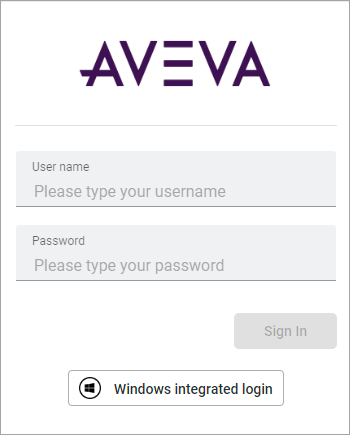
If you are already logged on to a Geo SCADA Expert system using SSO, the AVEVA Identity Manager window is not displayed. Instead, you are logged on to Geo SCADA Expert using your currently active SSO token.
Further Information
Creating a User Account: see Creating a User Account.
Log off from a Virtual ViewX client: see Log Off from ViewX.
Change Your Password: see Change your Password.