Install the AVEVA Adapter for Historic Data Export
You can optionally configure the AVEVA Historic Data Export driver in Geo SCADA Expert to export historic data to AVEVA PI Server or CONNECT data services. To facilitate this, Geo SCADA Expert uses the AVEVA Adapter for Historic Data Export to connect to the historian application (see Specify the Connection Mode). To use the AVEVA Historic Data Export driver in this way, you have to install and configure the AVEVA Adapter for Historic Data Export prerequisite on your Geo SCADA Expert server machines (see Geo SCADA Expert Prerequisite Components). You also have to install the AVEVA Operations Control Logger and the Microsoft .NET 8 prerequisites. Note that additional reboot(s) will be needed between installation of these prerequisite items. (The actual options that are offered in the Installation wizard vary, depending on the operating system and whether any of the components are already installed.)
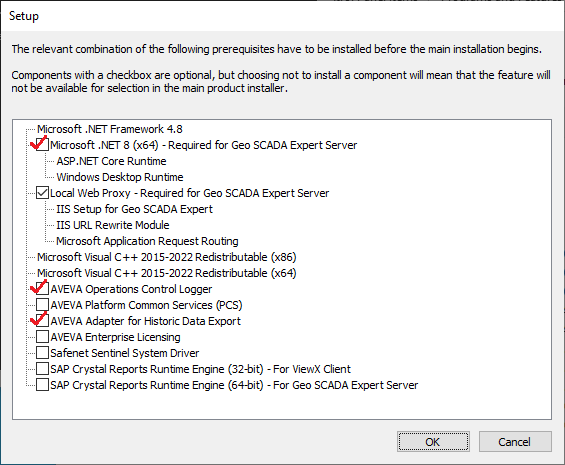
The AVEVA Adapter for Historic Data Export is installed automatically alongside Geo SCADA Expert on your Geo SCADA Expert server machines when the above prerequisites are installed.
You then need to configure the relevant AVEVA Adapter, AVEVA PI Server, and CONNECT data services parameters. You do this using the AVEVA Historic Data Export section of the Geo SCADA Expert Server Configuration Tool (see Configure the Server Settings for the AVEVA Historic Data Export Driver).
For a summary of the other configuration you have to perform in order for the driver to export historic data to the historian in an AVEVA application, see Introduction to the AVEVA Historic Data Export Driver.