Information
The General branch of the Server Status Tool includes an Information category. The category provides status information about the current status of the server's hardware and software. When applicable, it also displays warnings to highlight potential issues with system security or database usage.
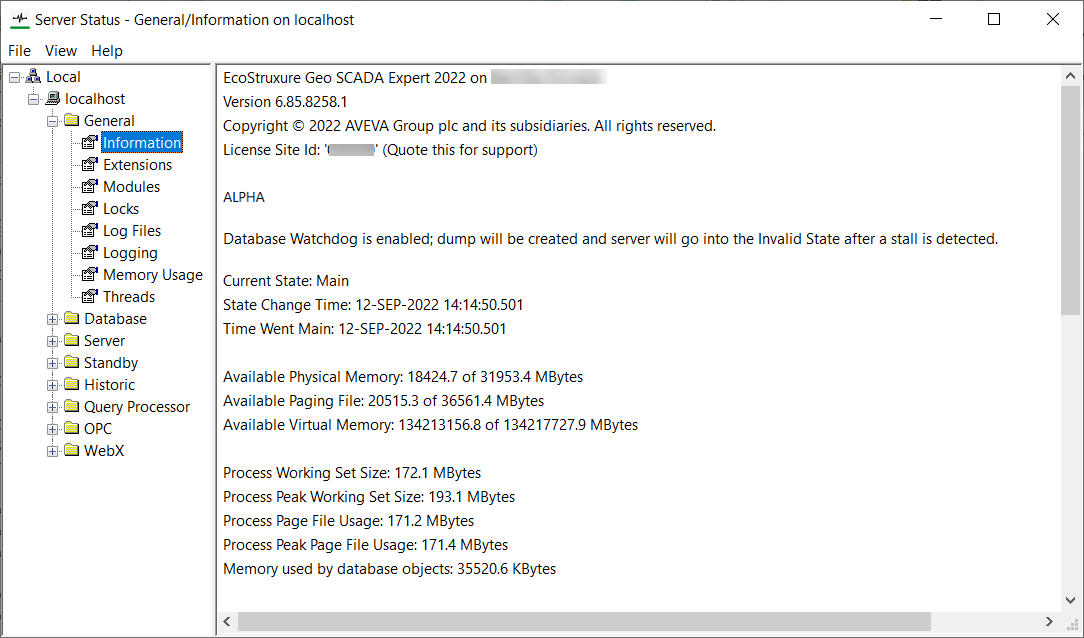
The Information category provides a variety of information about the server, including:
- The Version of Geo SCADA Expert that is running on the named server.
If an Emulating Database Version warning message is included lower down in this Information category, that latter entry indicates the format and database version to which database files are currently being saved on this server. When this applies, the database files will only be saved in the format that applies to the Version (rather than the Emulating Database Version) once Database Emulation has been deactivated
If an Emulating Server Version entry is included lower down in this Information category, this latter entry indicates the version that the server is currently emulating for client connections.
- The License Site Id that you should supply to the Schneider Electric Support team, if you contact them with a support query. The Site Id is a unique identifier that is associated with your support contract (providing that your license agreement includes customer support).
The Site Id is also available from the License Details window (see Display the License Details Window on a Geo SCADA Expert Server).
- On systems on which two-factor authentication is implemented and in use, details about the two-factor authentication that is currently deployed (see Specify the Two-Factor Authentication (2FA) Account Description).
- Warnings that relate to potential issues with system security or database usage (see below)
- The Emulating Server Version that the server is using for client connections. This entry is only displayed if the Server Emulation feature is currently enabled (
- The current state of the server, for example, Main
- The time that the server changed to its current state
- The time that the server last became Main
- The amount of available memory on the server
- The amount of available paging file
- The operating system that is being used
- The server ports that are in use and the applications that are using them
- The number of ViewX clients
- Details about the source of the license, specifically whether it is currently configured and being used. It also includes information about the supported version(s) of the license, the duration of the license runtime, and the end date of the license
Warnings Shown in Highlighted Text
When applicable, warnings are displayed to highlight potential issues with system security or database usage. These are shown towards the top of the Information category.

 Database Lock Usage was Above a Configured High Limit
The Geo SCADA Expert database has a primary measure of performance, the total database lock time. This time is a percentage value, and is used to measure how busy the server is when performing data read, calculations, and fulfilling client requests.
The lock statistics are shown in detail in other pages of the Server Status tool: on the General/Locks page and the Database/Lock Diagnostics Read and Lock Diagnostics Write pages. They are also recorded in the
Geo SCADA Expert also monitors a single metric each minute - the 'Database Lock Usage' statistic. This measures the overall database read and write lock usage per minute. This value is compared against two alarm thresholds and will raise (text/one-shot) alarms whenever the thresholds are exceeded.
This warning message indicates that the 'Database Lock Usage' statistic has exceeded a configured threshold. The threshold levels can be adjusted from the defaults if required
Emulating Database Version
With Geo SCADA Expert 2021 onwards, you can opt to enable Database Emulation when you upgrade the version of Geo SCADA Expert that is running on your servers
Once checks that been made to ensure that the upgrade is successful, you should deactivate the Database Emulation
The Emulating Database Version warning message indicates that Database Emulation is currently enabled on this particular server. It displays the version of Geo SCADA Expert software that is currently being emulated. This comprises the version of Geo SCADA Expert that the server was running just prior to the upgrade.
The message is removed once Database Emulation has been deactivated. Once this has happened, the database files get saved in the format that applies to the version of Geo SCADA Expert software to which the server was upgraded. (Details about the upgrade version are shown in the Version entry that appears at the top of the Information category.)
For more information, see Types of Emulation Supported by Geo SCADA Expert.
'Everyone' has Access to Root Group
The 'Everyone' User Group is a built-in User Group. Every User Account that is created on your system is automatically associated with the 'Everyone' User Group and automatically inherits the access and permissions that are assigned to that User Group. This includes the Guest User Account (a built-in User Account) that can be used to access the database from various clients without logging on.
On new installations, the 'Everyone' User Group and the Guest User Account are inactive and not assigned any security permissions by default.
This warning message indicates that the 'Everyone' User Group is enabled on your system and is configured to provide all User Accounts with some form of access to the whole database (from the 'Root' Group onwards). If the Guest User Account is also enabled, this means that users will also have some form of access to the whole database without logging on. We strongly recommend that you remove any security permissions from, and then deactivate the 'Everyone' User Group and Guest User Account. Instead, 'configured' User Groups and User Accounts should be used to provide the relevant levels of access to the database.
If the 'Everyone' User Group has to be used, it MUST be assigned the minimum permissions required, with access restricted where possible to just the relevant parts of the database.
For more information, see Guest User Account and Everyone User Group, and see Allocating Security Permissions.
Exception Dumps Configured to Include Full Memory Dumps
You can enable an Exception Dumps feature on each server. When enabled, the server generates diagnostic files (in the form of minidumps) if there is an exception (application error).
This warning message indicates that the Exception Dumps feature is enabled on this server, and that the feature is configured to generate a 'Full' exception dump file. This setting can result in very large but comprehensive dump files that take a long time to generate. We strongly recommend that 'Normal' exception dump files are configured (rather than 'Full' exception dump files). You should only set the Dump Type to 'Full' if instructed to do so by Schneider Electric. Regardless of the option chosen, ensure that the minidump files are set to be written to a suitable partition that has sufficient disk space and does not impact on the space used for other files.
For more information, see Enable or Disable Exception Dumps, and see Define the Server Logging Settings.
Log File Failed to Open
This warning message indicates that Geo SCADA Expert has made an unsuccessful attempt to access the main server log file. This message is displayed only if an issue occurs when attempting to access the database log file for the main server (rather than other diagnostic log files such as server snapshot and exception log files).
The warning message indicates the reason for the issue (such as 'Access is Denied') and the resulting action by Geo SCADA Expert (such as 'LOGGING SUSPENDED'). If a log file fails to open, Geo SCADA Expert will retry to open the log file when a new line is to be logged. Providing that the retry is successful, logging will then resume. With such a situation, the log file will include a 'LOGGING RESUMED...' entry. This indicates that some log file data might be missing in between the previously logged entry and this statement.
For more information, see Log Files.
Proposed and deployed 2FA configuration differ
This warning message indicates that the Two-Factor Authentication (2FA) Account Description configuration that now exists on the system differs to that of the two-factor authentication configuration that is currently in force across the system. You should ascertain whether the 'proposed' two-factor configuration is correct and, if so, whether it should be deployed across the system to replace the two-factor authentication configuration that is currently in force. Be aware that any changes to the current deployment are likely to impact users whose User Accounts are already enrolled for two-factor authentication (see Considerations and Limitations (2FA)). To deploy the 'proposed' two-factor authentication configuration across the system so that it comes into force in place of the existing deployed configuration, use the Deploy 2FA Configuration pick action.
You can ascertain the differences between the 'proposed' two-factor authentication configuration and the configuration that is currently in force across the system by comparing the Currently Deployed Two-Factor Authentication Status and Proposed Two-Factor Authentication status attributes on the Root Group (see Status Attributes that are Specific to the Root Group).
For more information, see Specify the Two-Factor Authentication (2FA) Account Description, and see Use Two-Factor Authentication with Geo SCADA Expert.
Also see the 'Two-Factor Authentication - No deployed configuration' entry in this 'Information' topic.
Super User Enabled
The Super User account is a special user account that has access to all Geo SCADA Expert features and database items. The Super User account is created when Geo SCADA Expert is first installed, to enable administrators to set up the system security and create custom 'configured' administrator-level User Accounts. Thereafter, the Super User account should be disabled to help prevent unrestricted high-level access to all areas of the system.
This warning message indicates that the Super User account is still enabled on your system. We strongly recommend that you ensure that suitably configured custom administrator-level User Accounts exist on your system, and that you should then seriously consider disabling the Super User account.
For more information,
Two-Factor Authentication - No deployed configuration
This warning message indicates that Two-Factor Authentication (2FA) Account Description configuration exists on the system, but neither that nor any other two-factor authentication configuration is currently in force across the system. As such, users are not required to provide two factors of authentication when they log on to the system. You should ascertain whether the 'proposed' two-factor configuration is correct and, if so, whether it should be implemented across the system. That particular section of two-factor authentication configuration only comes into force when the Deploy 2FA Configuration pick action is used to deploy that configuration across the system. Be aware that, once it is deployed, users whose User Accounts are configured to use two-factor authentication will be required to enroll for, and then use, two-factor authentication whenever they want to access the system (see Considerations and Limitations (2FA)).
For more information, see Specify the Two-Factor Authentication (2FA) Account Description, and see Use Two-Factor Authentication with Geo SCADA Expert.
Also see the 'Proposed and deployed 2FA configuration differ' entry in this 'Information' topic.
Upgrade Backup Disabled
By default, when you upgrade the version of Geo SCADA Expert software that is running on your Geo SCADA Expert server, an automatic backup is made of your database. The files are stored in a format that corresponds to the version of Geo SCADA Expert software that was running on the server just before the upgrade. If you decide that you want to roll back the Geo SCADA Expert software following the upgrade, you can downgrade back to that previous version of software and restore the backed-up database.
This warning message indicates that the feature to generate an automatic database backup on upgrade is disabled. Therefore an automatic backup of your database will not be made if you upgrade the Geo SCADA Expert software on this particular server machine. You should consider reinstating the automatic backup feature before the next software upgrade.
For more information,
Watchdog Dumps Configured to Include Full Memory Dumps
You can enable a Database Watchdog feature on each server. When enabled, the feature detects whether the server has 'frozen' (whereby excessive system loading or an error has caused the server to go into an invalid state).
This warning message indicates that the Database Watchdog feature is enabled on this server, and that the feature is configured to generate a 'Full' watchdog dump file. This setting can result in very large but comprehensive dump files that take a long time to generate. We strongly recommend that 'Normal' watchdog dump files are configured (rather than 'Full' watchdog dump files). You should only set the Dump Type to 'Full' if instructed to do so by Schneider Electric. Regardless of the option chosen, ensure that the minidump files are set up to be written to a suitable partition that has sufficient disk space and does not impact on the space required for other files. If Geo SCADA Expert is unable to create a dump file due to lack of space, it will delete the partially created file.
For more information, see Configure the Database Watchdog Settings.
Web Server Key or Key Algorithm Insecure
This warning message relates to Original WebX.
As Original WebX clients connect to your system via the network, extra security measures are required; these include the use of certificates to encrypt client-server communications.
This warning message indicates that a weak certificate is being used for the Web server. We strongly recommend that your Web security settings are tightened to use a secure key algorithm and a private key length of at least 2048 bits.
For more information, see Define the Certificate Settings for Original WebX Clients, and see Use a Trusted Certificate from a Certificate Authority.
Web Server Port Already in Use
This warning message relates to Original WebX.
The message indicates that the specified port is currently configured for use by the web server, however Geo SCADA Expert has detected that the specified port is already in use by another service or application. To assist with its identification, the message indicates the port number and whether it is configured as the HTTP or HTTPS port.
If such a message is displayed, you should:
-
Determine which application is currently using the configured port and, if the port is unneeded based on the usage of that application, reconfigure or unassign that port number.
-
If the existing port allocation cannot be changed, then change the web server configuration to use a different port number. If you change the HTTP port, then ensure that you change the port number both in the Server Configuration Tool and the IIS Manager application.
-
Repeat the changes on any other servers in your system as required.