What Happens if I add the same Group as the Edge Node Mapping and Device Mapping?
The configuration Form of a Sparkplug Publisher database item includes two mapping fields—Edge Node Mapping and Device Mapping (for more information on these fields, see Configure the Properties on the Sparkplug Publisher Tab). We recommend that you do not add the same Group to these two mapping fields if the Sparkplug client to which you publish data is a Geo SCADA Expert system that is running the Geo SCADA Expert Sparkplug driver. In the Device Mapping field, we recommend that you add only subgroups of the Node Root Group (the Group that is added to the Edge Node Mapping field).
If the Device Mapping Group is outside the Node Root Group, or is the same as the Node Root Group, then the entire Node Root Group of the Sparkplug Publisher is created as a subgroup in the Sparkplug client. The Sparkplug Devices or Points that you create using the Create Devices from Device Birth Messages and Create Points from Birth Metrics pick actions on the Sparkplug Edge Node are created within this subgroup. This is because the string representation of the Edge Node Mapping is not removed from the Device ID of the Device Mapping Group. This might affect the automatic creation of Sparkplug Devices or points if you opt to use a Property Translation Table that contains relative references to Devices, points, or other database items that are in the Node Root Group.
Add a subgroup of the Node Root Group as the Device Mapping (Recommended)
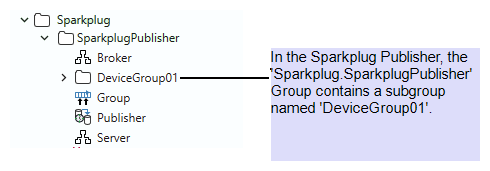
In the Sparkplug Publisher, a Group named 'Sparkplug.SparkplugPublisher' is added to the Edge Node Mapping field in a Sparkplug Publisher database item. This Group contains a subgroup named 'DeviceGroup01'.
'DeviceGroup01' is added to the Device Mapping field.
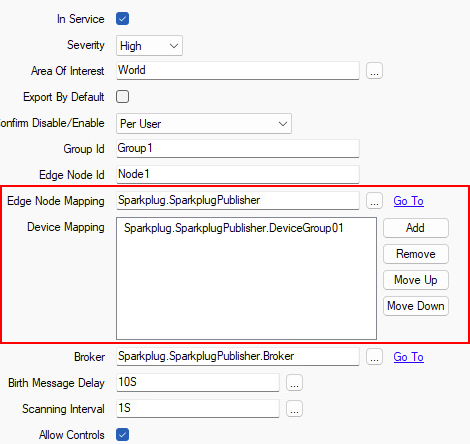
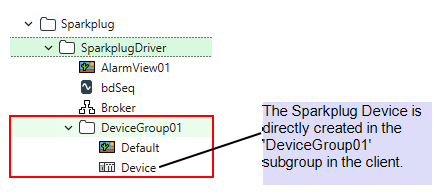
The Sparkplug client configuration exists in the 'Sparkplug.SparkplugDriver' Group in the client database. When you Create Devices from Device Birth Messages on the Sparkplug Edge Node, 'DeviceGroup01' is created in the same Group as the Sparkplug Edge Node in the Sparkplug client (that is, in the 'Sparkplug.SparkplugDriver' Group).
Add the same Group as the Edge Node Mapping and Device Mapping (Not Recommended)
In the Sparkplug Publisher, a Group named 'Sparkplug.SparkplugPublisher' is added to the Edge Node Mapping field in a Sparkplug Publisher database item. This Group contains a subgroup named 'DeviceGroup01'.
The 'Sparkplug.SparkplugPublisher' Group is also added to the Device Mapping field. This is not recommended.
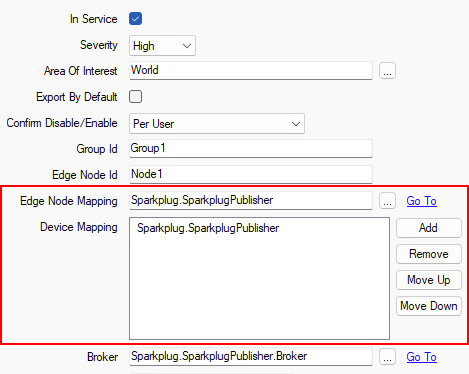
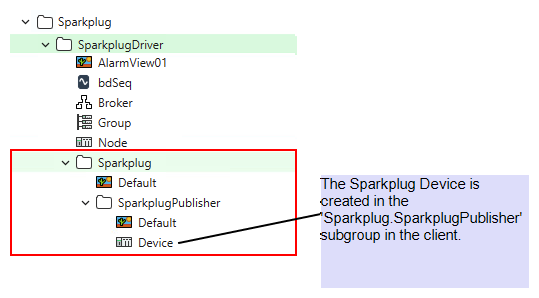
The Sparkplug client configuration exists in the 'Sparkplug.SparkplugDriver' Group in the client database. When you Create Devices from Device Birth Messages on the Sparkplug Edge Node, a new 'Sparkplug' subgroup is created. This 'Sparkplug' Group contains the 'Sparkplug Publisher' subgroup. The 'Sparkplug.Sparkplug Publisher' Group contains the 'DeviceGroup01' Group.
Further Information