Import Property Translation Table
Associated with: Sparkplug Publisher Property Translation Table items
Security permission required to access this pick action: Configure
You can optionally use a Property Translation Table if you intend to create and configure points automatically on the Sparkplug client, based on the points that exist in the Geo SCADA Expert database. (The points that you want to create on the client being the ones for which the Sparkplug Publisher is to publish historic data.)
You use the Property Translation Table to specify any point configuration properties that are to differ from the default values. Instead, the values of those configuration properties are to match the values that are configured for those properties in the Geo SCADA Expert database.
You create the content for the Property Translation Table outside of Geo SCADA Expert and then import the file into the database using the Import Property Translation Table pick action. You include in the file any point configuration properties for which the values are to differ from the defaults. For more information, see Create the Content for a Property Translation Table.
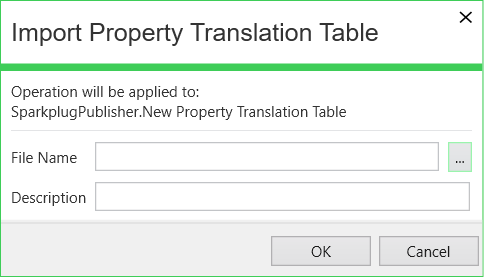
When you use the Import Property Translation Table pick action, the Import Property Translation Table dialog box is displayed. Use the dialog box to specify the following properties:
-
File Name—Enter the path and file name of the file that you want to import. (The file's content has to be in TSV format.) Use the browse button to display a Reference browse window and then select the required entry from the window.
-
Description—Optionally use this field to enter a description that is associated with the file. The description that you enter here is displayed in the Description status attribute of the Property Translation Table item. You might want to use this field, for example, to identify the collection of points for which for which Geo SCADA Expert is to use the imported content.
After triggering the pick action:
-
Use the Last Import Time attribute to check whether the TSV file has been imported successfully into the database.
-
Address any issues if the attempt to import the file did not succeed and then reattempt the import (see Create the Content for a Property Translation Table).
-
The configuration Form of each Sparkplug Publisher item includes a Property Translation Table field. Use the field to notify Geo SCADA Expert which Property Translation Table to use when the Sparkplug Publisher generates a birth message. For more information, see Configure the Properties on the Sparkplug Publisher Tab.
If using this pick action with the Automation Interface, you need to specify the method name ImportPropTransTbl.